
[LangChain] LangServe - 랭체인을 빠르게 배포(서빙)하기
LangServe로 invoke, stream, 그리고 채팅 UI까지 빠르게 제공하기
LangServe
1. 소개
- LangChain 객체를 FastAPI 서버에 즉시 배포할 수 있게 도와주는 라이브러리
- 단순히 엔드포인트를 열어주는 것을 넘어, LLM 애플리케이션에 필수적인 스트리밍, 비동기 처리, 입력 데이터 검증 등을 자동으로 처리해준다.
- FastAPI를 기반으로 만들어졌다.
2. 주요 기능
- 자동 스키마 생성 : Pydantic을 활용해 입력(Input)과 출력(Output)의 형식을 자동으로 정의
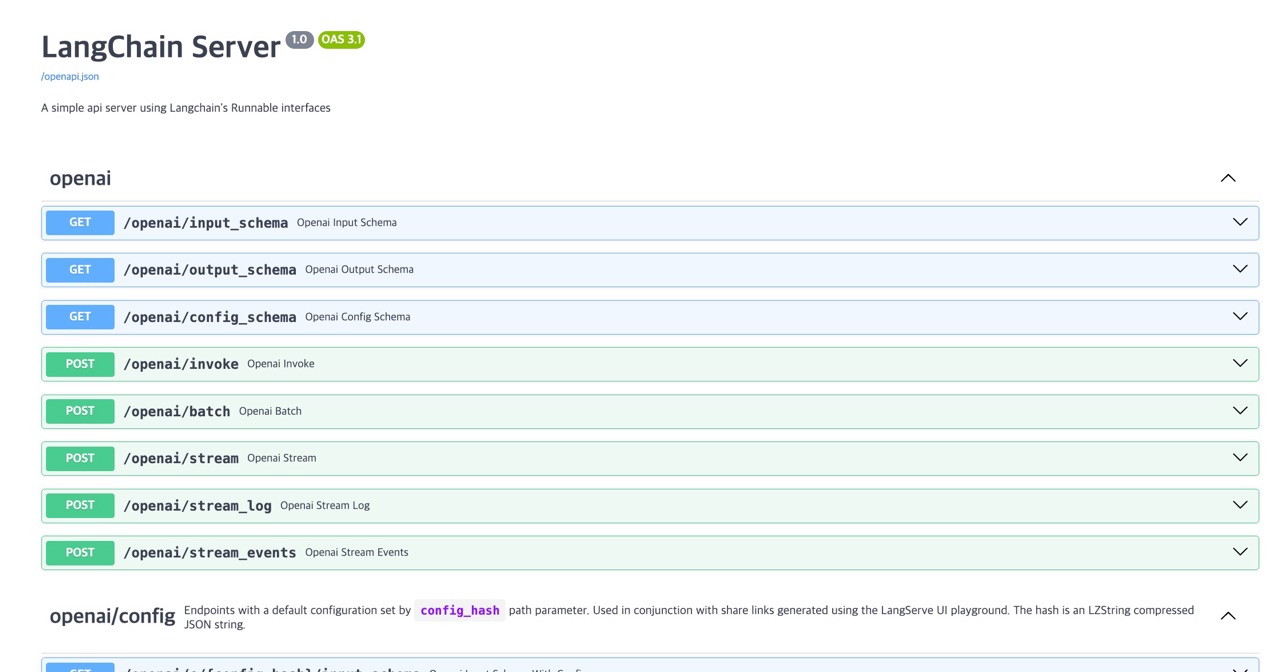
- 인터페이스 문서 자동 생성 : Swagger 인터페이스 문서를 자동으로 생성해준다.
- 스트리밍 지원 : 별도 구현 없이
stream엔드포인트를 통해 바로 사용할 수 있다. - Built-in Playground :
/playground경로로 접속만 해도 UI 상에서 직접 체인을 테스트하고 디버깅할 수 있는 환경이 제공됨 - LangSmith 연동 기능
사용법
1. 설치
1
2
3
4
5
6
7
8
9
10
11
# pip
pip install langserve
pip install fastapi
pip install uvicorn gunicorn # ASGI, WSGI
pip install sse_starlette

# uv
uv add langserve
uv add fastapi
uv add uvicorn gunicorn # ASGI, WSGI
uv add sse_starlette
2. 기본 애플리케이션 코드
1
2
3
4
5
6
7
8
9
10
11
12
13
14
15
16
17
18
19
20
21
22
23
24
25
26
27
28
29
30
31
32
33
34
35
36
37
38
39
40
41
42
43
44
45
46
47
48
49
50
51
52
53
54
55
56
57
58
59
60
61
62
63
64
65
66
67
68
69
70
71
72
73
# main.py

from fastapi import FastAPI
from pydantic import BaseModel, Field
from langchain_core.prompts import ChatPromptTemplate, MessagesPlaceholder
from langchain_core.messages import HumanMessage, AIMessage, SystemMessage
from langchain_core.output_parsers import StrOutputParser
from langchain_openai import ChatOpenAI
from langchain_google_genai import ChatGoogleGenerativeAI
from langserve import add_routes
from typing import List, Union

# API 키 세팅 메서드
def set_api_key():
    import os
    os.environ["OPENAI_API_KEY"] = "MY_OPENAI_APIKEY"
    os.environ["GOOGLE_API_KEY"] = "MY_GOOGLE_APIKEY"
set_api_key()

# FastAPI
app = FastAPI(
    title="LangChain Server",
    version="1.0",
    description="A simple api server using Langchain's Runnable interfaces",
)

# OpenAI 라우터 추가
add_routes(
    app,
    ChatOpenAI(model="gpt-4o-mini"),
    path="/openai",
)

# Gemini 라우터 추가
add_routes(
    app,
    ChatGoogleGenerativeAI(model="gemini-2.5-flash"),
    path="/gemini",
)

# joke 라우터 추가
model = ChatGoogleGenerativeAI(model="gemini-2.5-flash")
prompt = ChatPromptTemplate.from_template("tell me a joke about {topic}")
add_routes(
    app,
    prompt | model,
    path="/joke",
)

# playground=chat 모드
class InputChat(BaseModel):
    messages: List[Union[HumanMessage, AIMessage, SystemMessage]] = Field(
        ...,
        description="The chat messages representing the current conversation.",
    )
chat_model = ChatGoogleGenerativeAI(model="gemini-2.5-flash", streaming=True) # Playground Chat 모드에서는 streaming 옵션을 필수
chat_prompt = ChatPromptTemplate.from_messages([
    ("system", "You are a helpful assistant."),
    MessagesPlaceholder(variable_name="messages"),
])
chat_parser = StrOutputParser()
chain = chat_prompt | chat_model | chat_parser
add_routes(
    app,
    chain.with_types(input_type=InputChat),
    path="/chat_ai",
    playground_type="chat" # playground_type = chat
)

# 파일 실행시
if __name__ == "__main__":
    import uvicorn
    uvicorn.run(app, host="localhost", port=8000)
- 코드 실행
1
2
3
4
5
# pip
python main.py

# uv
uv run main.py
3. LangServe API
| 엔드포인트 | 메서드 | 한글 설명 |
|---|---|---|
/my_runnable/invoke |
POST | 입력값 하나에 대해 실행하고 그 최종 결과물만 반환받음 |
/my_runnable/batch |
POST | 여러 개의 입력값을 한 번에 보내서 결과 여러 개를 리스트로 받음 |
/my_runnable/stream |
POST | 실행 과정을 출력 단위로 끊어서 실시간으로 받음(스트리밍) |
/my_runnable/stream_log |
POST | 최종 결과뿐만 아니라 중간 단계의 출력값들을 로그 형태로 모두 받음 |
/my_runnable/astream_events |
POST | 실행 중 발생하는 모든 세부 이벤트(토큰 생성 등)를 실시간 중계로 받음 |
/my_rannable/playground |
만든 랭체인을 테스트해볼 수 있는 UI 화면 제공 | |
/my_runnable/input_schema |
GET | 어떤 데이터를 넣어야 하는지 입력 형식(스키마)을 확인 |
/my_runnable/output_schema |
GET | 어떤 데이터가 나오는지 출력 형식(스키마)을 확인 |
/my_runnable/config_schema |
GET | 어떤 설정값(Config)을 쓸 수 있는지 설정 형식(스키마)을 확인 |
https://github.com/langchain-ai/langserve
4. Swagger
- 접속방법 :
http://localhost:8000/docs - 사용 가능한 엔드포인트에 대한 인터페이스 명세를 볼 수 있음
5. Playground
(1) 소개
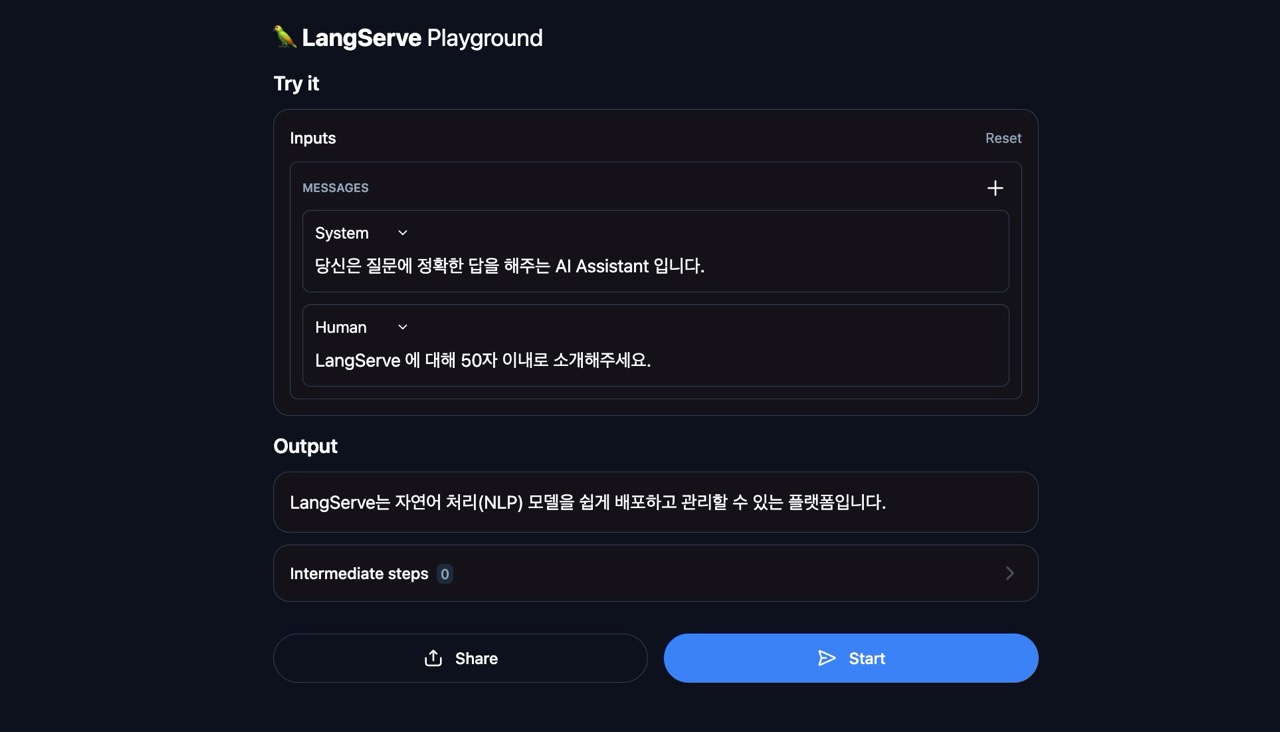
- 만든 Runnable (=랭체인 애플리케이션)을 UI를 통해 테스트해볼 수 있는 기능
- 접속은
http://localhost:8000/{Runnable이름}/playground
(2) 기본 Playground
playground_type을 지정하지 않았을 때 볼 수 있는 기본 UI- 상단에 예시를 든 코드 기준으로는
http://localhost:8000/openai/playground - 개발단에서 System Prompt 와 Human Prompt를 지정하는 방식을 UI 로 그대로 가져왔다.
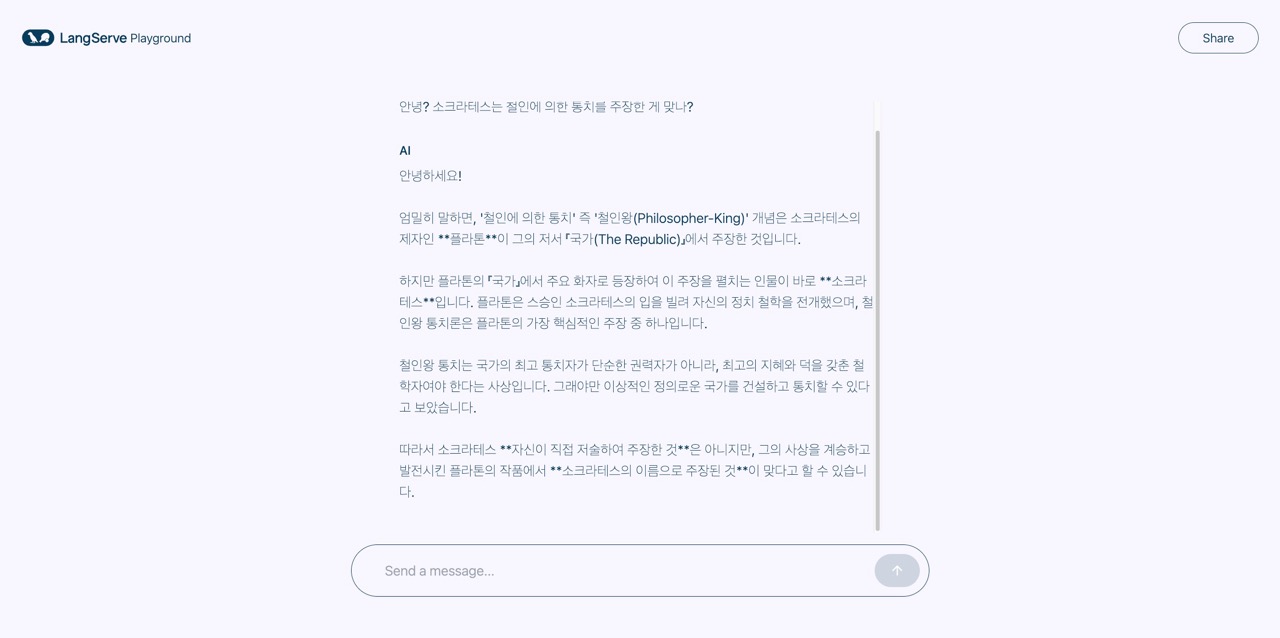
(3) Chat UI 유형의 Playground
playground_type을chat으로 지정했을 때 볼 수 있는 UI- 상단 예시 코드 기준으로는
http:localhost:8000/chat_ai/playground - 쉽게 생각할 수 있는 “AI 채팅 화면” 과 비슷한 UI 가 제공된다.
Reference
Introducing LangServe, the best way to deploy your LangChains
LangServe Launch Example - Swagger UI
https://github.com/langchain-ai/langserve
(주의 : langserve 깃헙 README 에는 다소 오래된 내용이 남아있는 듯하다. 현재와 맞지 않을 수 있으니 주의)
// reading compass
이 글과 이어지는 경로
시리즈, 카테고리, 태그 겹침, 최신도를 점수화해 가까운 글일수록 중심에 배치합니다.
hover nodes or cards · click a node to pin
Next reads
0
댓글 남기기