
[LangGraph] Custom Stream - 랭그래프에서 직접 Stream 응답을 만들기
그리고 OpenAI Compatible API 로 감싸주기
Intro
LangGraph를 사용하다 보면, LLM 답변을 토큰 단위로 스트리밍해야 하는 경우가 많을 것이다. 보통은 이 때 app.stream() 메서드를 사용하며 stream_mode="messages" 옵션을 사용해 LLM이 생성하는 토큰을 그대로 받아오면 된다.
하지만 모든 스트리밍이 LLM 답변이 아닐 수 있다. 예를 들어 다음과 같은 progress 를 화면에 출력한다고 생각해보자.
1
2
3
4
사용자의 입력을 확인했습니다.
임의의 숫자를 생성했습니다.
조건을 비교하고 있습니다.
반복 실행 결과를 정리하고 있습니다.
이러한 메시지들은 LLM이 생성한 답변이 아니고, 애플리케이션 내부 로직에서 발생하는 진행상황들에 대한 설명이다.
이런 경우에는 LangGraph 노드 안에서 직접 스트림 메시지를 만들어야 하는데, 이를 위해 get_stream_writer()를 사용할 수 있다. (그리고 이렇게 만든 스트림을 custom stream 이라고 한다.)
이번 글에서는 custom stream 을 만들고, 이를 OpenAI Compatible API로 래핑하는 작업까지 살펴본다.
LLM 스트리밍과 Custom 스트리밍의 차이
- 본격적으로 주제를 다루기에 앞서, 랭그래프에서의 스트리밍 모드 차이를 알아두자.
- LLM 답변을 스트리밍 하는 경우, 랭그래프에서는 보통 아래와 같이 스트리밍을 구성한다.
1
graph.stream(input_state, stream_mode="messages")
- 하지만 이번에 구축할 것과 같이, 직접 생성하는 출력을 스트리밍 하기 위해서는
custom이라는 stream_mode를 적용해야 한다.
1
graph.stream(input_state, stream_mode="custom")
LangGraph에서 직접 stream 출력하기
1. 예제 전문
- 예제로 가져온 것은, 간단한 Up-Down 게임 랭그래프이다.
- 사용자가 숫자를 입력하면, 그래프는 임의의 숫자를 생성하고 사용자가 입력한 숫자와 비교한다.
- 조건을 만족할 때까지 이를 반복하다가, 조건을 만족하면 마지막에 응답을 반환한다.
- 먼저 state를 살펴보면 아래와 같다.
1
2
3
4
5
6
7
8
from typing import TypedDict

class AppState(TypedDict):
    input:int
    step:str
    value:int
    count:int
    response:str
- 다음은 노드들이다.
1
2
3
4
5
6
7
8
9
10
11
12
13
14
15
16
17
18
19
20
21
22
23
24
25
26
27
28
29
30
31
32
33
34
35
36
37
import random
import time
from langgraph.config import get_stream_writer

def input_routing_function(state:AppState):
    writer = get_stream_writer()
    writer(f"사용자의 입력 : {state['input']}\n")
    return state["input"] < 0

def generate_node(state:AppState):
    value = random.randint(1, 100)
    count = state["count"] + 1
    progress = f"임의의 숫자 생성 ({count}회차) : {value}\n"
    writer = get_stream_writer()
    writer(progress)
    return {"value" : value, "count" : count, "step":progress}

def routing_function(state:AppState):
    time.sleep(random.randint(2, 15)/10)
    return state["input"] > state["value"]

def terminate_node(state:AppState):
    writer = get_stream_writer()

    if "value" not in state.keys():
        chunks = ["사용자가 ", "입력한 ", f"{state['input']}", "은(는) ", "0보다", " ", "작습니다."]
    else:
        chunks = [f"{state['count']} ", "번 ", "반복 ", "실행됐", "습니다."]

    full_text = ""

    for chunk in chunks:
        writer(chunk)
        time.sleep(random.randint(1, 10)/10)
        full_text += chunk

    return {"response" : full_text}
- 그리고 이를 빌드하는 그래프 코드이다.
1
2
3
4
5
6
7
8
9
10
11
12
13
14
class UpDownGameGraph:

    @staticmethod
    def build():
        graph = StateGraph(AppState)
        graph.add_node("generate", nodes.generate_node)
        graph.add_node("terminate", nodes.terminate_node)

        graph.add_conditional_edges(START, nodes.input_routing_function, {True:"terminate", False:"generate"})
        graph.add_conditional_edges("generate", nodes.routing_function, {True:"terminate", False:"generate"})
        graph.add_edge("terminate", END)

        app = graph.compile()
        return app, graph
2. stream_writer 를 통해 스트리밍 메시지 만들기
이번에는 노드 내부에서 직접 스트리밍 메시지를 내보내는 방법을 살펴보자. 예시로 generate_node 코드를 확인해보자.
1
2
3
4
5
6
7
8
# generate_node
def generate_node(state:AppState):
    value = random.randint(1, 100)
    count = state["count"] + 1
    progress = f"임의의 숫자 생성 ({count}회차) : {value}\n"
    writer = get_stream_writer()
    writer(progress)
    return {"value" : value, "count" : count, "step":progress}
generate_node는 임의의 숫자를 생성하고, 생성된 값과 실행 횟수를 다음 노드로 전달하는 역할을 한다.
이때 단순히 state만 반환하면 사용자는 그래프 내부에서 어떤 일이 일어나고 있는지 알 수 없다. 따라서 중간 진행 상황을 사용자에게 전달하기 위해 get_stream_writer()를 사용한다.
1
writer = get_stream_writer()
get_stream_writer() 는 현재 그래프 실행 컨텍스트에서 사용할 수 있는 stream writer를 가져온다. 그리고 이 writer를 통해 원하는 메시지를 custom stream 으로 내보낼 수 있다.
1
writer(progress)
위 코드가 실행되면 progress 에 담긴 메시지가 즉시 스트림으로 전달된다. 즉, generator_node는 state를 업데이트하는 동시에 사용자에게 다음과 같은 진행 메시지도 실시간으로 보여줄 수 있는 것이다.
1
임의의 숫자 생성 (1회차) : 42
3. LLM 답변처럼 청크단위로 쪼개어 출력하기
이번에는 최종 응답을 만드는 terminate_node를 살펴보자.
1
2
3
4
5
6
7
8
9
10
11
12
13
14
15
16
def terminate_node(state:AppState):
    writer = get_stream_writer()

    if "value" not in state.keys():
        chunks = ["사용자가 ", "입력한 ", f"{state['input']}", "은(는) ", "0보다", " ", "작습니다."]
    else:
        chunks = [f"{state['count']} ", "번 ", "반복 ", "실행됐", "습니다."]

    full_text = ""

    for chunk in chunks:
        writer(chunk)
        time.sleep(random.randint(1, 10)/10)
        full_text += chunk

    return {"response" : full_text}
이 노드는 최종 응답을 한 번에 반환하지 않고, LLM이 토큰을 생성하듯이 여러 개의 청크로 나누어 출력한다.
이를 위해 먼저 응답으로 사용할 문장을 chunks 리스트에 나누어 담는다.
1
2
3
4
if "value" not in state.keys():
    chunks = ["사용자가 ", "입력한 ", f"{state['input']}", "은(는) ", "0보다", " ", "작습니다."]
else:
    chunks = [f"{state['count']} ", "번 ", "반복 ", "실행됐", "습니다."]
이렇게 나누어둔 문자열을 하나씩 writer() 에 전달하면, 각 청크가 순서대로 스트리밍된다.
time.sleep()은 실제 LLM이 토큰을 조금씩 생성하는 것처럼 보이도록 지연 시간을 주기 위해 넣은 코드다.
1
2
3
for chunk in chunks:
    writer(chunk)
    time.sleep(random.randint(1, 10)/10)
- 스트리밍과 별개로,
invoke를 위해서는 state에 response 텍스트가 들어가야 한다. - 이를 위해서, 토큰 단위로 쪼개어진 응답을 하나의 텍스트(
full_text) 로 묶어 state에 업데이트하는 과정을 수행한다. - 스트리밍에만 집중하면 빼먹기 쉬운 부분이므로 주의!
1
2
3
4
5
6
7
8
full_text = ""

for chunk in chunks:
    writer(chunk)
    time.sleep(random.randint(1, 10)/10)
    full_text += chunk

return {"response" : full_text}
3. 출력 테스트
- 이제 앱을 실행하고 테스트를 해보자. 우선은 터미널을 통해 입출력을 수행해본다.
1
2
3
4
5
6
def main():
    while True:
        app, graph = UpDownGameGraph.build()
        user_input = int(input("숫자를 입력해주세요 : "))
        for token in app.stream({"input":user_input, "count":0}, stream_mode="custom"):
            print(token)
- 실행하고, 사용자 입력으로 “10”이라는 숫자를 넣었다.
1
2
3
4
5
6
7
8
9
10
11
12
숫자를 입력해주세요 : 10

임의의 숫자 생성 (1회차) : 21
임의의 숫자 생성 (2회차) : 73
임의의 숫자 생성 (3회차) : 12
임의의 숫자 생성 (4회차) : 3
4
번
반복
실행됐
습니다.
숫자를 입력해주세요 :
OpenAI Compatible API 로 감싸기
1. 코드 구성
펼치기/접기
1
2
3
4
5
6
7
8
9
10
11
12
13
14
15
16
17
18
19
20
21
22
23
24
25
26
27
28
29
30
31
32
33
34
35
36
37
38
39
40
41
42
43
44
45
46
47
48
49
50
51
52
53
54
55
56
57
58
59
60
61
62
63
64
65
66
67
68
69
70
71
72
73
74
75
76
77
78
79
80
81
82
83
84
85
86
87
88
89
90
91
92
93
94
95
96
97
98
99
100
101
102
103
104
105
106
107
108
109
110
111
112
113
114
115
116
117
118
119
120
121
122
123
124
125
126
127
128
129
130
131
132
133
134
135
136
137
138
139
140
141
142
143
144
145
146
147
148
149
150
151
152
153
154
155
156
157
import time
import uuid
from fastapi import FastAPI, Request
from fastapi.responses import StreamingResponse
import json
import uvicorn
import random
from graph.builder import UpDownGameGraph

app = FastAPI()

model_list = ["up-down-game"]

# /v1/models
@app.get("/v1/models")
async def list_models():
    return {
        "object": "list",
        "data": [
            {
                "id": model,
                "object": "model",
                "created": int(time.time()),
                "owned_by": "local"
            } for model in model_list
        ]
    }

# /v1/chat/completions
@app.post("/v1/chat/completions")
async def chat_completions(request: Request):
    body = await request.json()

    # 요청 파라미터
    model = body.get("model", model_list[0])
    messages = body.get("messages", [])
    stream = body.get("stream", False)

    # 가장 마지막 user 메시지 추출
    user_message = ""
    for msg in reversed(messages):
        if msg.get("role") == "user":
            user_message = msg.get("content", "")
            break

    # LangGraph 애플리케이션 빌드
    app, graph = UpDownGameGraph.build()
    input_value = int(user_message)
    input_state = {"input":int(input_value), "count":0}

    # LangGraph 호출 예시
    ## 1. stream == false 인 경우
    if not stream:
        last_state = app.invoke(input_state)
        response = last_state["response"]
        return {
            "id": f"chatcmpl-{uuid.uuid4().hex}",
            "object": "chat.completion",
            "created": int(time.time()),
            "model": model,
            "choices": [
                {
                    "index":0,
                    "messages": {
                        "role": "assistant",
                        "content": response
                    },
                    "finish_reason": "stop"
                }
            ],
            "usage": {
                "prompt_tokens": 0,
                "completion_tokens": 0,
                "total_tokens": 0
            }
        }

    ## 2. stream != false 인 경우
    async def event_generator():
        response_id = f"chatcmpl-{uuid.uuid4().hex}"
        created = int(time.time())

        ### 1) 첫 chunk : assistant role 알림
        first_chunk = {
            "id": response_id,
            "object": "chat.completion.chunk",
            "created": created,
            "model": model,
            "choices": [
                {
                    "index": 0,
                    "delta": {
                        "role": "assistant"
                    },
                    "finish_reason": None
                }
            ]
        }
        yield f"data: {json.dumps(first_chunk, ensure_ascii=False)}\n\n"

        ### 2) 중간 chunk : content (실제 답변)
        for token in app.stream(input_state, stream_mode="custom"):
            chunk = {
                "id": response_id,
                "object": "chat.completion.chunk",
                "created": created,
                "model": model,
                "choices": [
                    {
                        "index": 0,
                        "delta": {
                            "content": token
                            },
                        "finish_reason": None
                    }
                ]
            }
            yield f"data: {json.dumps(chunk, ensure_ascii=False)}\n\n"
            # ensure_ascii=False : json dumps에서 한글을 \uXXX로 이스케이프 하지 않고 그대로 보내기 위한 옵션
            # \n\n : SSE에서 "이 이벤트 하나가 끝났다"라는 구분자. 반드시 필요.

        ### 3) 종료 chunk
        done_chunk = {
            "id": response_id,
            "object": "chat.completion.chunk",
            "created": created,
            "model": model,
            "choices": [
                {
                    "index": 0,
                    "delta": {}, # 빈 delta
                    "finish_reason": "stop"
                }
            ]
        }
        yield f"data: {json.dumps(done_chunk, ensure_ascii=False)}\n\n"

        ### 4) 종료 신호
        yield "data: [DONE]\n\n"

    return StreamingResponse(
        event_generator(),                # 스트리밍 제너레이터
        media_type="text/event-stream"    # 미디어 타입
    )

# fastapi
def main():
    uvicorn.run(
        "main:app",
        host="0.0.0.0",
        port=8000,
        reload=True,
    )

if __name__ == "__main__":
    main()
- 코드 전문은 길이가 길어, 필요할시 위 “펼치기” 버튼을 이용한다.
- OpenAI Compatible API 를 만드는 방식은 이전 포스팅을 참고한다.
- 중요한 부분은, 빌드한 랭그래프를 스트리밍하고, 스트림 모드를 커스텀으로 지정해주는 부분이다. (
app.stream()+ 스트림 모드를custom으로 지정)
1
2
3
4
5
6
7
8
9
10
11
12
13
14
15
16
17
for token in app.stream(input_state, stream_mode="custom"):
    chunk = {
        "id": response_id,
        "object": "chat.completion.chunk",
        "created": created,
        "model": model,
        "choices": [
            {
                "index": 0,
                "delta": {
                    "content": token
                    },
                "finish_reason": None
            }
        ]
    }
    yield f"data: {json.dumps(chunk, ensure_ascii=False)}\n\n"
2. API 테스트
(1) invoke 테스트
- 이렇게 만든 API 를 테스트해보자.
- 먼저, stream=false 옵션을 적용하여 답변을 받아본다.
1
2
3
4
5
6
7
8
9
10
11
12
13
14
// 요청
// URL : http://localhost:8000/v1/chat/completion
// METHOD : POST
// BODY :
{
  "model": "up-down-game",  // 모델 목록에서 조회 가능한 ID
  "messages": [             // 메시지 목록
    {
      "role": "user",
      "content": "10"
    }
  ],
  "stream": false,     // 스트리밍 답변 적용 여부
}
1
2
3
4
5
6
7
8
9
10
11
12
13
14
15
16
17
18
19
20
21
22
// 응답
{
    "id": "chatcmpl-6c94c4fabcfa4a82ac4d96143586dcef",
    "object": "chat.completion",
    "created": 1777985626,
    "model": "up-down-game",
    "choices": [
        {
            "index": 0,
            "messages": {
                "role": "assistant",
                "content": "13 번 반복 실행됐습니다."
            },
            "finish_reason": "stop"
        }
    ],
    "usage": {
        "prompt_tokens": 0,
        "completion_tokens": 0,
        "total_tokens": 0
    }
}
(2) stream 테스트
- 이번에는 stream=true 옵션을 적용해본다.
1
2
3
4
5
6
7
8
9
10
11
12
13
14
// 요청
// URL : http://localhost:8000/v1/chat/completion
// METHOD : POST
// BODY :
{
  "model": "up-down-game",  // 모델 목록에서 조회 가능한 ID
  "messages": [             // 메시지 목록
    {
      "role": "user",
      "content": "10"
    }
  ],
  "stream": true,     // 스트리밍 답변 적용 여부
}
- 응답은 내용이 많아 주요 부분만 나열해본다.
1
2
3
4
5
6
7
8
9
10
11
"choices": [{"index": 0,"delta": {"role": "assistant"},"finish_reason": null}]
"choices": [{"index": 0,"delta": {"content": "임의의 숫자 생성 (1회차) : 88\n"},"finish_reason": null}]
"choices": [{"index": 0,"delta": {"content": "임의의 숫자 생성 (2회차) : 50\n"},"finish_reason": null}]
...
"choices": [{"index": 0,"delta": {"content": "24 "},"finish_reason": null}]
"choices": [{"index": 0,"delta": {"content": "번 "},"finish_reason": null}]
"choices": [{"index": 0,"delta": {"content": "반복 "},"finish_reason": null}]
"choices": [{"index": 0,"delta": {"content": "실행됐"},"finish_reason": null}]
"choices": [{"index": 0,"delta": {"content": "습니다."},"finish_reason": null}]
"choices": [{"index": 0,"delta": {},"finish_reason": "stop"}]
[DONE]
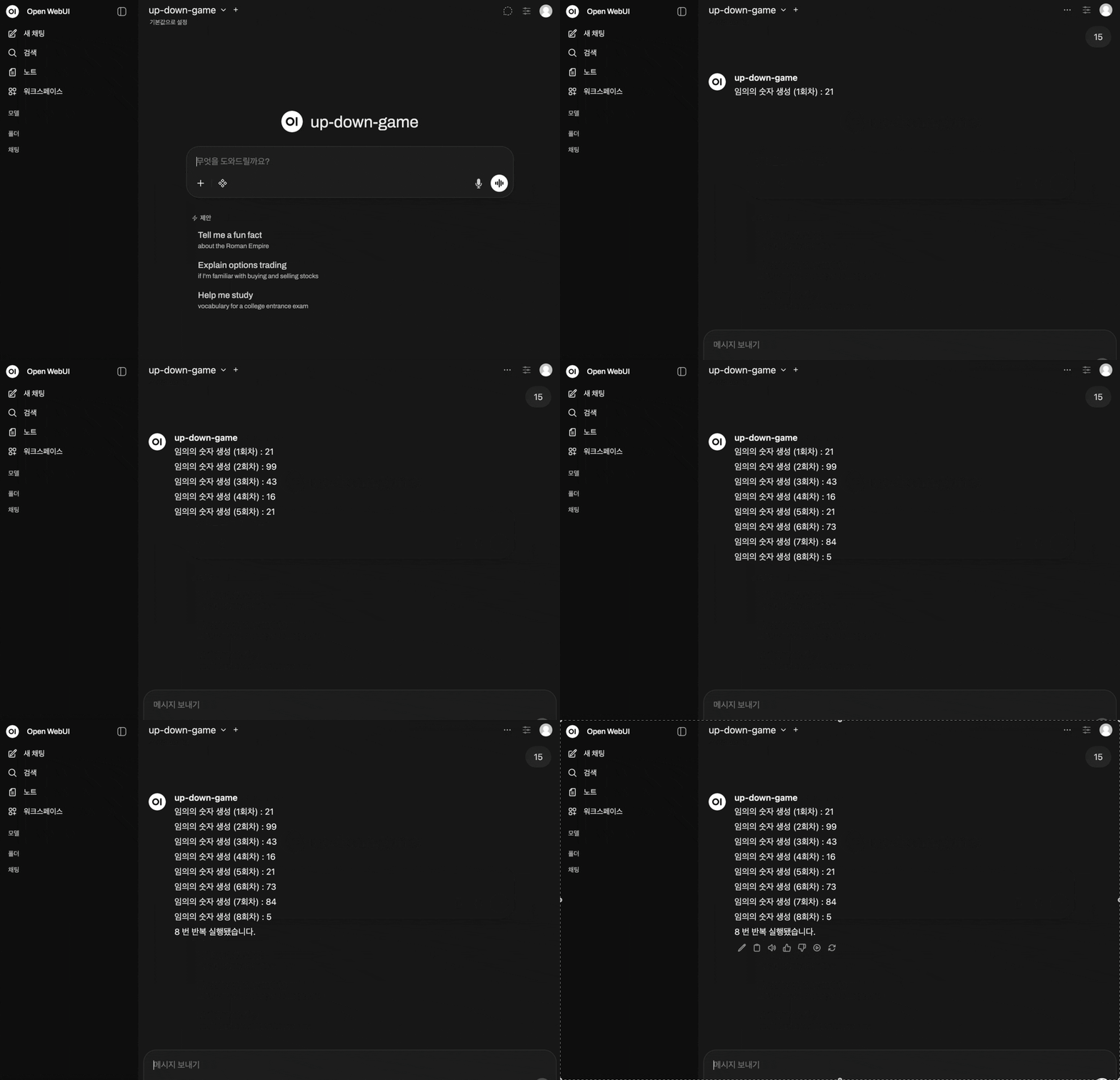
3. OpenWebUI와 연결
- OpenAI Compatible API 로 만들었으므로, OpenWebUI와 연결하기는 쉽다.
// reading compass
이 글과 이어지는 경로
시리즈, 카테고리, 태그 겹침, 최신도를 점수화해 가까운 글일수록 중심에 배치합니다.
댓글 남기기