
[LangGraph] Node 노드의 개념과 사용법
랭그래프에서 실제 작업을 수행하는 작업자, 노드
노드 Node
1. 노드의 개념
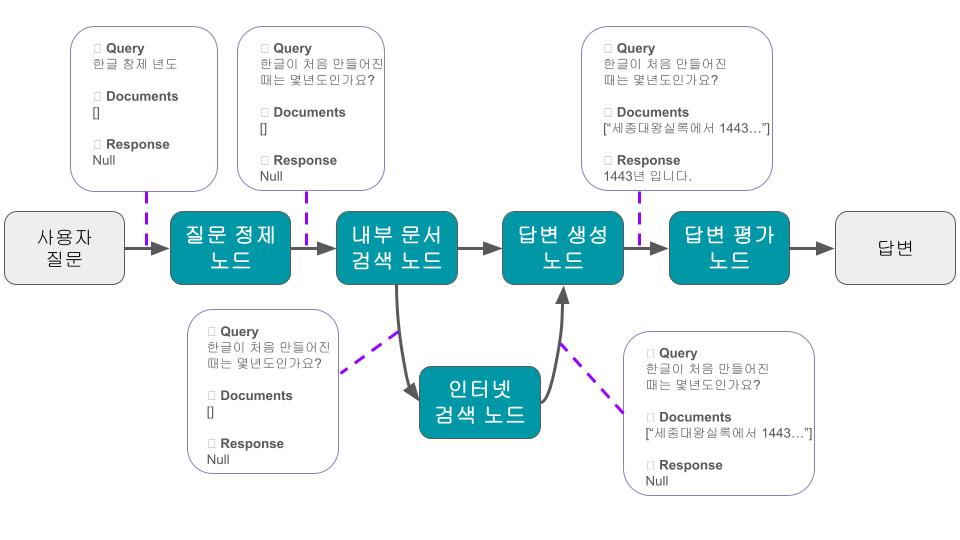
- 특정한 작업을 수행하는 “작업 함수” 역할, 기본 실행 단위
- 그래프의 상태(State)를 입력으로 받아 지정된 작업을 수행한 뒤, 상태의 변경 부분을 반환한다.
- 상태 외로, 설정(RunnableConfig)과 런타임(Runtime) 객체도 입력으로 받을 수 있다.
- 동기 노드, 비동기 노드가 존재한다.
2. 입력 파라미터
- state : 그래프의 상태
- config : 구성 정보 등을 포함하는 RunnableConfig 객체
- runtime : 런타임 컨텍스트와 기타 정보를 포함하는 Runtime 객체
3. 노드의 기본 구조
(1) 노드 선언과 정의
- 기본적으로 함수의 형태를 가진다.
- State(필수), Runtime, RunnableConfig 세 가지 메타데이터를 받을 수 있다.
-
입력으로 State를 받고, 출력으로 State의 업데이트 된 부분을 반환한다.
- 기본적인 노드
1
2
3
def plain_node(state: State):
    result = some_working()
    return {"work_result":result}
- 런타임을 포함하는 노드
1
2
3
def node_with_runtime(state: State, runtime: Runtime[Context]):
    print("In node: ", runtime.context.user_id)
    return {"results": f"Hello, {state['input']}!"}
- 메타데이터를 포함하는 노드
1
2
3
4
5
6
def inspect_metadata(state: dict, config: RunnableConfig) -> dict:
    metadata = config["metadata"]
    print(f"Step: {metadata['langgraph_step']}")
    print(f"Node: {metadata['langgraph_node']}")
    print(f"Triggers: {metadata['langgraph_triggers']}")
    return state
(2) 그래프에 노드 추가
- 그래프의
add_node메서드를 사용해 그래프에 노드를 추가한다. add_node는 (1) 노드 별칭 (2) 노드 함수 두 가지 파라미터를 받는다.- 노드 별칭을 지정하지 않으면, 함수 이름이 노드 별칭으로 지정된다.
1
2
3
4
5
builder = StateGraph(State)
...
builder.add_node("plain_node", plain_node)
builder.add_node("node_with_runtime", node_with_runtime)
builder.add_node("node_with_execution_info", node_with_execution_info)
(3) 시작 노드와 종료 노드 지정
add_edge메서드와START또는END문자열 객체로 시작노드와 종료노드를 지정한다.START: 그래프의 시작을 알리는 가상 노드END: 그래프의 종료를 알리는 가상 노드
1
2
graph.add_edge(START, "node_a")
graph.add_edge("node_f", END)
- 참고로 아래 방식으로도 시작 노드와 종료 노드를 지정할 수 있다.
set_entry_point메서드로 시작 노드를 지정하며set_finish_point메서드로 종료 노드를 지정한다.
1
2
graph.set_entry_point("node_a")
graph.set_finish_point("node_f")
4. 예시 코드
1
2
3
4
5
6
7
8
9
10
11
12
13
14
15
16
17
18
19
20
21
22
23
24
25
26
27
28
29
30
31
32
33
34
35
36
37
38
39
40
41
42
#### (1) 전체 코드

```python
# 출처 : https://docs.langchain.com/oss/python/langgraph/graph-api#nodes
from dataclasses import dataclass
from typing_extensions import TypedDict

from langgraph.graph import StateGraph
from langgraph.runtime import Runtime

class State(TypedDict):
    input: str
    results: str

@dataclass
class Context:
    user_id: str

builder = StateGraph(State)

def plain_node(state: State):
    return state

def node_with_runtime(state: State, runtime: Runtime[Context]):
    print("In node: ", runtime.context.user_id)
    return {"results": f"Hello, {state['input']}!"}

def node_with_execution_info(state: State, runtime: Runtime):
    print("In node with thread_id: ", runtime.execution_info.thread_id)
    return {"results": f"Hello, {state['input']}!"}

def inspect_metadata(state: dict, config: RunnableConfig) -> dict:
    metadata = config["metadata"]
    print(f"Step: {metadata['langgraph_step']}")
    print(f"Node: {metadata['langgraph_node']}")
    print(f"Triggers: {metadata['langgraph_triggers']}")
    return state

builder.add_node("plain_node", plain_node)
builder.add_node("node_with_runtime", node_with_runtime)
builder.add_node("node_with_execution_info", node_with_execution_info)
...
```
Reference
Graph API overview - Docs by LangChain
// reading compass
이 글과 이어지는 경로
시리즈, 카테고리, 태그 겹침, 최신도를 점수화해 가까운 글일수록 중심에 배치합니다.
hover nodes or cards · click a node to pin
Next reads
0
댓글 남기기