
OpenAI 호환 Chat Completion API 형식
1. 소개
- 내가 만든 LLM 애플리케이션을 UI(여기선 Open Web UI)와 붙이려고 한다. 뭐가 필요할까?
- UI 에서 기대하는 소통 방식을 맞추는 작업이 필요할 것이다.
- 이 때 가장 많이 사용되는 방식이 바로 OpenAI 호환 Chat Completion API 형식이다.
- OpenAI-Compatible은 “진짜 OpenAI 서버는 아니지만” OpenAI API와 같은 요청/응답 형식을 흉내내는 서버를 말한다.
- OpenWebUI, LiteLLM, vLLM, Ollama, LMStudio, LangGraph 서버 등이 이 방식을 많이 채택한다.
2. 엔드포인트
- OpenAI Compatible API 의 핵심은 아래 두 개의 엔드포인트이다.
| endpoint | method | 설명 |
|---|---|---|
/v1/models |
GET | • 사용 가능한 모델 목록을 반환하는 엔드포인트 |
v1/chat/completions |
POST | • 메시지에 대해 답변을 생성해 반환하는 엔드포인트 |
2-1. /v1/models
- 현재 서버에서 사용할 수 있는 모델 목록을 조회하는 엔드포인트
- GET 요청이며, 보통 요청 body가 없다.
- OpenAI API Key를 가지고 있다면, 아래 명령어로 실제 OpenAI의 응답 형태를 볼 수 있다.
1
2
curl https://api.openai.com/v1/models \
-H "Authorization: Bearer $OpenAI_API_KEY"
- 응답은 아래와 같은 형태를 가진다.
1
2
3
4
5
6
7
8
9
10
11
12
13
14
15
16
17
18
19
20
21
22
23
24
{
  "object": "list",
  "data": [
    {
      "id": "text-embedding-ada-002",
      "object": "model",
      "created": 1671217299,
      "owned_by": "openai-internal"
    },
    ...
    {
      "id": "gpt-5.5-pro",
      "object": "model",
      "created": 1776894349,
      "owned_by": "system"
    },
    {
      "id": "gpt-5.5-pro-2026-04-23",
      "object": "model",
      "created": 1776894470,
      "owned_by": "system"
    }
  ]
}
| 필드 | 의미 | 중요 여부 |
|---|---|---|
object |
목록 응답임을 표시한다. 보통 "list" |
|
data |
모델 목록 배열. | 중요 |
data[].id |
모델 이름. UI들에서 모델을 선택할 때 이 이름이 보인다. | 중요 |
data[].object |
객체의 타입. 보통 "model" |
|
data[].created |
생성 시각 Unix timestamp | |
data[].owned_by |
모델 소유자 표시. 예: "system" , "local" |
2-2. /v1/chat/completions
- 메시지를 보내고, 이에 대한 AI 응답을 받는 엔드포인트
- 모델이 생성한 메시지 뿐 아니라, 생성 시각, 사용 모델, 객체 타입, 사용량 정보 등이 포함됨
(1) 요청
1
2
3
curl https://api.openai.com/v1/chat/completions \
  -H "Authorization: Bearer $OPENAI_API_KEY" \
  -H "X-Client-Request-Id: 123e4567-e89b-12d3-a456-426614174000"
1
2
3
4
5
6
7
8
9
10
11
12
13
14
15
16
17
18
19
20
21
{
  "model": "my-langgraph",  // 모델 목록에서 조회 가능한 ID
  "messages": [             // 메시지 목록
    {
      "role": "system",
      "content": "You are a helpful assistant."
    },
    {
      "role": "user",
      "content": "LangGraph가 뭐야?"
    }
  ],
  "temperature": 0.7,  // 창의성(답변의 랜덤성). 0 이상
  "stream": false,     // 스트리밍 답변 적용 여부
  "top_p": 1,          // 샘플링 범위
  "max_completion_tokens": 1024, // 출력 토근 수 제한
  "stop": ["\nUser:", "</END>"], // 특정 문자열이 나오면 생성 멈춤
  "presence_penalty": 0,   // 이미 나온 주제를 다시 말하는 것을 억제
  "frequency_penalty": 0,  // 같은 단어 반복을 억제
  "n": 1                   // 응답 후보 개수
}
| 항목 | 타입 | 역할 | 필수 여부 |
|---|---|---|---|
model |
string | 사용할 모델 ID | 필수 |
messages |
array | 대화 히스토리. system, user, assistant 메시지가 들어온다. |
필수 |
stream |
boolean | 응답을 한 번에 받을지, chunk 단위로 받을지 | 선택 |
temperature |
number | 답변의 랜덤성, 창의성을 조절 | 선택 |
top_p |
number | 확률 누적 기준으로 샘플링 범위를 조절 | 선택 |
max_completion_tokens |
integer | 최대 출력 토큰 수 | 선택 |
stop |
string 또는 array | 특정 문자열이 나오면 생성을 중단 | 선택 |
n |
integer | 응답 후보 개수 | 선택 |
presence_penalty |
number | 이미 나온 주제를 다시 말하는 경향을 줄임 | 선택 |
frequency_penalty |
number | 같은 단어·표현 반복을 줄임 | 선택 |
logprobs |
boolean | 생성 토큰의 확률 정보를 요청 | 선택 |
| 등등 .. |
(2) 응답
- streaming이 아닌 경우
1
2
3
4
5
6
7
8
9
10
11
12
13
14
15
16
17
18
19
20
21
{
  "id": "chatcmpl-abc123",
  "object": "chat.completion",
  "created": 1710000000,
  "model": "my-langgraph",
  "choices": [
    {
      "index": 0,
      "message": {
        "role": "assistant",
        "content": "LangGraph는 LLM 기반 워크플로우를 그래프 구조로 구성하고 실행할 수 있게 해주는 프레임워크입니다."
      },
      "finish_reason": "stop"
    }
  ],
  "usage": {
    "prompt_tokens": 0,
    "completion_tokens": 0,
    "total_tokens": 0
  }
}
| 필드 | 의미 |
|---|---|
id |
응답 ID. 임의 생성해도 됨. |
object |
응답 객체 타입. 보통 "chat.completion" |
created |
생성 시각 Unix timestamp |
model |
사용된 모델명 |
choices |
모델 응답 후보 배열 |
choices[0].message.role |
응답 메시지의 역할(role). 보통 "assistant" |
choices[0].message.content |
실제 화면에 표시될 답변. |
choices[0].finish_reason |
종료 이유. 보통 "stop" |
usage |
토큰 사용량. 모르면 0으로 둬도 됨. |
- streaming 인 경우 : event-stream 방식으로, 여러 번 나눠져서 응답이 반환됨
1
2
3
4
5
# 응답 헤더
HTTP/1.1 200 OK
Content-Type: text/event-stream  # 중요
Cache-Control: no-cache
Connection: keep-alive
1
2
3
4
5
6
7
8
// 전체 응답
data: {"id":"chatcmpl-abc123","object":"chat.completion.chunk","created":1710000000,"model":"my-langgraph","choices":[{"index":0,"delta":{"role":"assistant"},"finish_reason":null}]}
data: {"id":"chatcmpl-abc123","object":"chat.completion.chunk","created":1710000000,"model":"my-langgraph","choices":[{"index":0,"delta":{"content":"LangGraph"},"finish_reason":null}]}
data: {"id":"chatcmpl-abc123","object":"chat.completion.chunk","created":1710000000,"model":"my-langgraph","choices":[{"index":0,"delta":{"content":"는 "},"finish_reason":null}]}
data: {"id":"chatcmpl-abc123","object":"chat.completion.chunk","created":1710000000,"model":"my-langgraph","choices":[{"index":0,"delta":{"content":"LLM 워크플로우를 "},"finish_reason":null}]}
data: {"id":"chatcmpl-abc123","object":"chat.completion.chunk","created":1710000000,"model":"my-langgraph","choices":[{"index":0,"delta":{"content":"그래프 구조로 구성하는 프레임워크입니다."},"finish_reason":null}]}
data: {"id":"chatcmpl-abc123","object":"chat.completion.chunk","created":1710000000,"model":"my-langgraph","choices":[{"index":0,"delta":{},"finish_reason":"stop"}]}
data: [DONE]
1
2
3
4
5
6
7
8
9
10
11
12
13
14
15
16
17
18
19
20
21
22
23
24
25
26
27
28
29
30
31
32
33
34
35
36
37
38
39
40
41
42
43
44
45
46
47
48
49
// 응답을 하나만 떼어서 보면
// 첫 응답
data: {
    "id": "chatcmpl-abc123",
    "object": "chat.completion.chunk",
    "created": 1710000000,
    "model": "my-langgraph",
    "choices": [
        {
            "index": 0,
            "delta": {
                "role": "assistant"
            },
            "finish_reason": null
        }
    ]
}

// 중간 응답
data: {
    "id": "chatcmpl-abc123",
    "object": "chat.completion.chunk",
    "created": 1710000000,
    "model": "my-langgraph",
    "choices": [
        {
            "index": 0,
            "delta": {
                "content": "는 "
            },
            "finish_reason": null
        }
    ]
}

// 마지막 응답
data: {
    "id": "chatcmpl-abc123",
    "object": "chat.completion.chunk",
    "created": 1710000000,
    "model": "my-langgraph",
    "choices": [
        {
            "index": 0,
            "delta": {},
            "finish_reason": "stop"
        }
    ]
}
| 위치 | 필드 | 의미 |
|---|---|---|
| 전체 | data: |
SSE 이벤트 데이터 prefix. 각 이벤트는 data:로 시작함. |
| JSON | id |
같은 응답 안에서는 보통 동일한 ID를 유지함. |
| JSON | object |
객체유형. 스트리밍 chunk이므로 "chat.completion.chunk" |
| JSON | created |
Unix timestamp |
| JSON | model |
사용된 모델 ID |
| JSON | choices[0].index |
응답 후보 인덱스입니다. 보통 0 |
| JSON | choices[0].delta |
이번 chunk에서 새로 추가된 내용. |
| JSON | delta.role |
첫 chunk에만 있으며, assistant 역할을 알려줌. |
| JSON | delta.content |
실제로 이어붙일 텍스트 조각입니다. |
| JSON | finish_reason |
생성 종료 여부. 진행 중에는 null, 끝나면 "stop" |
| 마지막 | [DONE] |
스트리밍이 완전히 끝났다는 신호. |
3. OpenAI Compatible을 제공하는 FastAPI 예시
(1) FastAPI 코드
- 주요항목은 주석을 표시함
1
2
3
4
5
6
7
8
9
10
11
12
13
14
15
16
17
18
19
20
21
22
23
24
25
26
27
28
29
30
31
32
33
34
35
36
37
38
39
40
41
42
43
44
45
46
47
48
49
50
51
52
53
54
55
56
57
58
59
60
61
62
63
64
65
66
67
68
69
70
71
72
73
74
75
76
77
78
79
80
81
82
83
84
85
86
87
88
89
90
91
92
93
94
95
96
97
98
99
100
101
102
103
104
105
106
107
108
109
110
111
112
113
114
115
116
117
118
119
120
121
122
123
124
125
126
127
128
129
130
131
132
133
134
135
136
137
138
139
140
141
142
143
144
145
146
147
148
149
import time
import uuid
from fastapi import FastAPI, Request
from fastapi.responses import StreamingResponse
import json
import uvicorn
import random

app = FastAPI()

model_list = ["my-model", "your-model", "up-down-gamer"]
owned_list = ["local", "system"]

# /v1/models
@app.get("/v1/models")
async def list_models():
    return {
        "object": "list",
        "data": [
            {
                "id": model,
                "object": "model",
                "created": int(time.time()),
                "owned_by": random.sample(owned_list, 1)
            } for model in model_list
        ]
    }

# /v1/chat/completions
@app.post("/v1/chat/completions")
async def chat_completions(request: Request):
    body = await request.json()

		# 요청 파라미터
    model = body.get("model", model_list[0])
    messages = body.get("messages", [])
    stream = body.get("stream", False)

    # 가장 마지막 user 메시지 추출
    user_message = ""
    for msg in reversed(messages):
        if msg.get("role") == "user":
            user_message = msg.get("content", "")
            break

    # LangGraph 호출 예시
    ## 1. stream == false 인 경우
    if not stream:
        return {
            "id": f"chatcmpl-{uuid.uuid4().hex}",
            "object": "chat.completion",
            "created": int(time.time()),
            "model": model,
            "choices": [
                {
                    "index":0,
                    "messages": {
                        "role": "assistant",
                        "content": f"사용자의 '{user_message}' 에 대한 답변 입니다."
                    },
                    "finish_reason": "stop"
                }
            ],
            "usage": {
                "prompt_tokens": 0,
                "completion_tokens": 0,
                "total_tokens": 0
            }
        }

    ## 2. stream != false 인 경우
    async def event_generator():
        response_id = f"chatcmpl-{uuid.uuid4().hex}"
        created = int(time.time())

        ### 1) 첫 chunk : assistant role 알림
        first_chunk = {
            "id": response_id,
            "object": "chat.completion.chunk",
            "created": created,
            "model": model,
            "choices": [
                {
                    "index": 0,
                    "delta": {
                        "role": "assistant"
                    },
                    "finish_reason": None
                }
            ]
        }
        yield f"data: {json.dumps(first_chunk, ensure_ascii=False)}\n\n"

        ### 2) 중간 chunk : content (실제 답변)
        for token in ["사용자", "의 ", "질문인 ", user_message, "에 ", "대한 ", "답변", "입니다."]:
            chunk = {
                "id": response_id,
                "object": "chat.completion.chunk",
                "created": created,
                "model": model,
                "choices": [
                    {
                        "index": 0,
                        "delta": {
                            "content": token
                            },
                        "finish_reason": None
                    }
                ]
            }
            time.sleep(random.randint(2, 3)/20)
            yield f"data: {json.dumps(chunk, ensure_ascii=False)}\n\n"
            # ensure_ascii=False : json dumps에서 한글을 \uXXX로 이스케이프 하지 않고 그대로 보내기 위한 옵션
            # \n\n : SSE에서 "이 이벤트 하나가 끝났다"라는 구분자. 반드시 필요.

        ### 3) 종료 chunk
        done_chunk = {
            "id": response_id,
            "object": "chat.completion.chunk",
            "created": created,
            "model": model,
            "choices": [
                {
                    "index": 0,
                    "delta": {}, # 빈 delta
                    "finish_reason": "stop"
                }
            ]
        }
        yield f"data: {json.dumps(done_chunk, ensure_ascii=False)}\n\n"

        ### 4) 종료 신호
        yield "data: [DONE]\n\n"

    return StreamingResponse(
        event_generator(),                # 스트리밍 제너레이터
        media_type="text/event-stream"    # 미디어 타입
    )

def main():
    uvicorn.run(
        "main:app",
        host="0.0.0.0",
        port=8000,
        reload=True,
    )

if __name__ == "__main__":
    main()
(2) 실행
1
2
3
4
5
# pip
python main.py

# uv
uv run main.py
(3) API 요청 테스트 - /v1/models
- 요청
1
curl http://localhost:8000/v1/models
- 응답
1
2
3
4
5
6
7
8
9
10
11
12
13
14
15
16
17
18
19
20
21
22
23
24
25
26
27
28
29
{
    "object": "list",
    "data": [
        {
            "id": "my-model",
            "object": "model",
            "created": 1777906763,
            "owned_by": [
                "local"
            ]
        },
        {
            "id": "your-model",
            "object": "model",
            "created": 1777906763,
            "owned_by": [
                "system"
            ]
        },
        {
            "id": "up-down-gamer",
            "object": "model",
            "created": 1777906763,
            "owned_by": [
                "local"
            ]
        }
    ]
}
(4) API 요청 테스트 - /v1/chat/completions (stream=false)
- 요청
1
2
3
URL : http://localhost:8000/v1/chat/completions
헤더 : {'Content-Type': 'application/json'}
메서드 : POST
1
2
3
4
5
6
7
8
9
10
11
12
13
14
15
16
17
18
19
20
21
22
// body
{
  "model": "my-model",
  "messages": [
    {
      "role": "system",
      "content": "You are a helpful assistant."
    },
    {
      "role": "user",
      "content": "LangGraph가 뭐야?"
    }
  ],
  "temperature": 0.7,
  "stream": false,    // stream=false
  "top_p": 1,
  "max_completion_tokens": 1024,
  "stop": ["\nUser:", "</END>"],
  "presence_penalty": 0,
  "frequency_penalty": 0,
  "n": 1
}
- 응답
1
2
3
4
5
6
7
8
9
10
11
12
13
14
15
16
17
18
19
20
21
{
    "id": "chatcmpl-5ebdd7ffc6aa4fe3b5ab92b4b9a39acd",
    "object": "chat.completion",
    "created": 1777906561,
    "model": "my-model",
    "choices": [
        {
            "index": 0,
            "messages": {
                "role": "assistant",
                "content": "사용자의 'LangGraph가 뭐야?' 에 대한 답변 입니다."
            },
            "finish_reason": "stop"
        }
    ],
    "usage": {
        "prompt_tokens": 0,
        "completion_tokens": 0,
        "total_tokens": 0
    }
}
(5) API 요청 테스트 - /v1/chat/completions (stream=true)
- 요청
1
2
3
URL : http://localhost:8000/v1/chat/completions
헤더 : {'Content-Type': 'application/json'}
메서드 : POST
1
2
3
4
5
6
7
8
9
10
11
12
13
14
15
16
17
18
19
20
21
22
// body
{
  "model": "my-model",
  "messages": [
    {
      "role": "system",
      "content": "You are a helpful assistant."
    },
    {
      "role": "user",
      "content": "LangGraph가 뭐야?"
    }
  ],
  "temperature": 0.7,
  "stream": false,    // stream=true
  "top_p": 1,
  "max_completion_tokens": 1024,
  "stop": ["\nUser:", "</END>"],
  "presence_penalty": 0,
  "frequency_penalty": 0,
  "n": 1
}
- 응답
1
2
3
4
5
6
7
8
9
10
11
12
13
14
15
16
17
18
19
20
21
22
23
24
25
26
27
28
29
30
31
32
33
34
35
36
37
38
39
40
41
42
43
44
45
46
47
48
49
50
51
52
53
54
55
56
57
58
59
60
61
62
63
64
65
66
67
68
69
70
71
72
73
74
75
76
77
78
79
80
81
82
83
84
85
86
// 첫 청크
{
    "id": "chatcmpl-ffc251be3bef49e8acce943ebc4335c4",
    "object": "chat.completion.chunk",
    "created": 1777908056,
    "model": "my-model",
    "choices": [
        {
            "index": 0,
            "delta": {
                "role": "assistant"
            },
            "finish_reason": null
        }
    ]
}

// 내용 청크
{
    "id": "chatcmpl-ffc251be3bef49e8acce943ebc4335c4",
    "object": "chat.completion.chunk",
    "created": 1777908056,
    "model": "my-model",
    "choices": [
        {
            "index": 0,
            "delta": {
                "content": "사용자"
            },
            "finish_reason": null
        }
    ]
}

{
    "id": "chatcmpl-ffc251be3bef49e8acce943ebc4335c4",
    "object": "chat.completion.chunk",
    "created": 1777908056,
    "model": "my-model",
    "choices": [
        {
            "index": 0,
            "delta": {
                "content": "의 "
            },
            "finish_reason": null
        }
    ]
}

...

{
    "id": "chatcmpl-ffc251be3bef49e8acce943ebc4335c4",
    "object": "chat.completion.chunk",
    "created": 1777908056,
    "model": "my-model",
    "choices": [
        {
            "index": 0,
            "delta": {
                "content": "입니다."
            },
            "finish_reason": null
        }
    ]
}

// 마지막 청크
{
    "id": "chatcmpl-ffc251be3bef49e8acce943ebc4335c4",
    "object": "chat.completion.chunk",
    "created": 1777908056,
    "model": "my-model",
    "choices": [
        {
            "index": 0,
            "delta": {},
            "finish_reason": "stop"
        }
    ]
}

// 종료 신호
[DONE
]
4. OpenWebUI 와 연결해보았다.
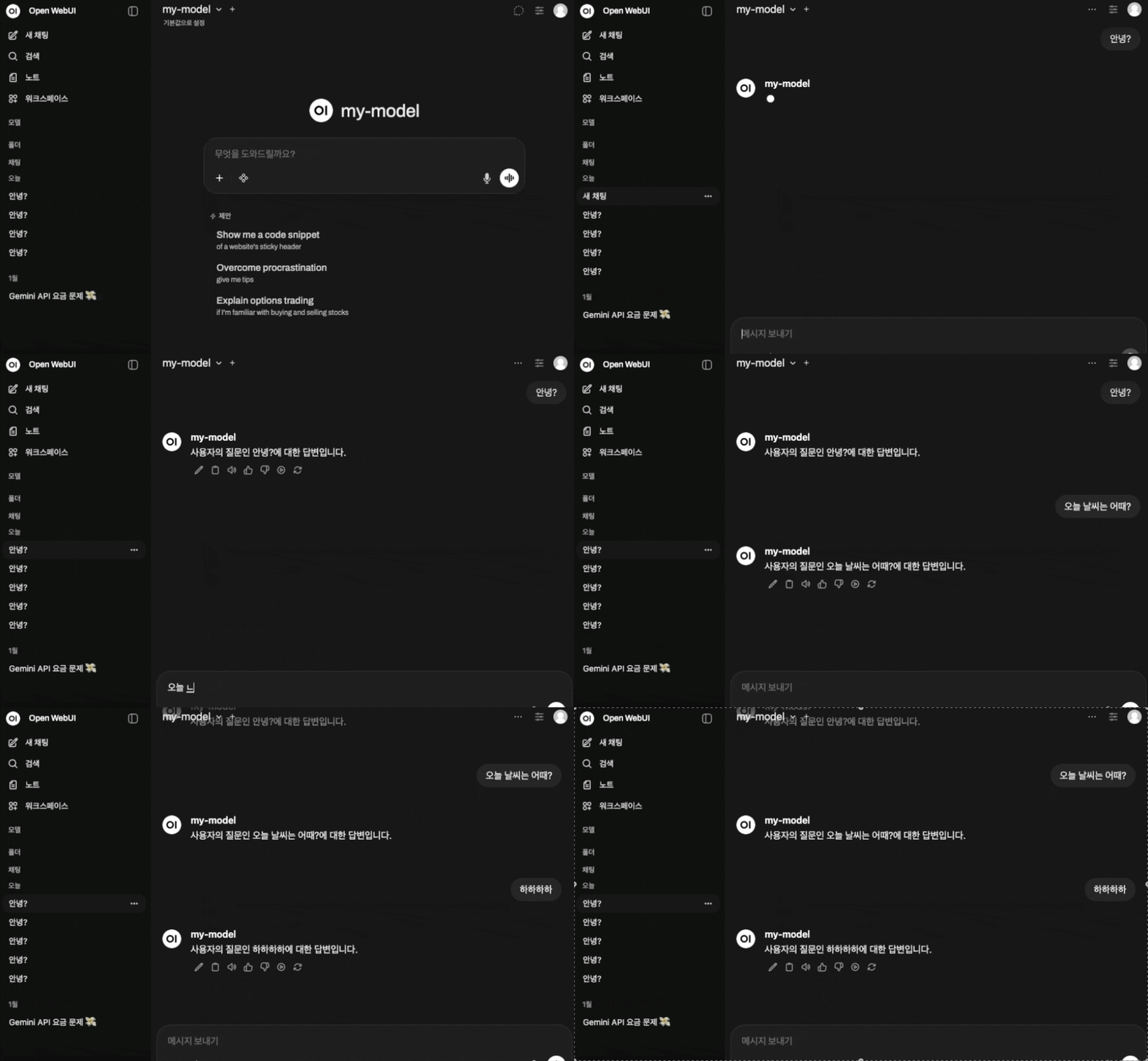
- 설정해둔 답변 형식에 따라 잘 답변이 출력되는 것을 볼 수 있다.
- OpenWebUI와 연결할 때에는 관리자 패널에서 url
http://{서버IP}:{PORT}/v1연결을 추가해주면 된다.
Reference
OpenAI Developers - API Overview
OpenAI Developers - Create chat completion
Comments