
[Vector DB] Chroma 빠르게 구축 가능한 벡터 DB
오픈소스, 쉬운 사용법, 임베딩 모델 친화적
Chroma 소개

1. 소개
- AI를 위한 오픈 소스 벡터 데이터 인프라
- 임베딩과 메타데이터를 저장
- 밀집 벡터 및 희소 벡터를 이용한 검색 (벡터 검색)
- 메타데이터를 이용한 필터링 (메타데이터를 이용한 검색)
- 이를 이용해 텍스트, 이미지, 오디오 등을 색인하고 검색할 수 있음
- Apache2.0 라이선스
2. 설치(파이썬 환경)
1
2
3
4
5
# uv 사용시
uv add chromadb

# pip 사용시
pip install chromadb
3. Chroma DB 의 핵심 구성 요소
(1) 클라이언트
Client: Chroma에 접속해 사용하는 클라이언트/진입점
(2) 데이터모델
Collection: 데이터 저장 및 쿼리의 기본 단위로, RDB의 테이블과 유사한 개념이다. 한 개 이상의 아이템을 가진다.- 컬렉션에 저장되는 한 개의 아이템은
id,embedding,document,metadata로 구성된다. Database: 컬렉션을 그룹화한 단위로, 논리적인 네임스페이스의 역할을 한다.Tenant: 데이터를 완전히 격리하는 최상위 논리적 구분 단위. 서로 다른 프로젝트, 서로 다른 고객의 데이터를 분리함
(3) 데이터 구조
| 항목 | 설명 |
|---|---|
| ids | 각 레코드(데이터, 또는 아이템)을 식별하는 고유한 문자열 |
| embeddings | 저장하려는 벡터 값 |
| documents | 저장하려는 벡터 값에 대한 원본 데이터(문서 내용 등) |
| metadatas | 레코드에 대한 부가 데이터로, 문자열, 정수, 부동 소수점 또는 부울형 및 이들을 포함한 배열 |
https://docs.trychroma.com/docs/collections/add-data
3. Chroma DB 를 사용하는 4가지 구조
(1) In-Memory Client
- 인메모리 클라이언트 구조
- 데이터를 저장하는 Chroma Server를 로컬 PC의 메모리 안에서 실행한다.
- 데이터가 메모리에만 저장되고, 디스크나 다른 장소에 남지 않으므로 프로그램 종료시 휘발된다.
- 설정이 간단해 튜토리얼, 실습, 세션 동안에만 데이터가 유지되면 되는 경우에 사용하기 좋다.
1
2
3
import chromadb

client = chromadb.Client()
(2) Persistent Client
- 로컬 디스크에 영구적으로 데이터를 저장하는 임베디드 구조
- 클라이언트 인스턴스를 생성할 때 데이터 저장 경로를 지정해준다.
- 데이터가 입력되면 자동으로 저장되며, 클라이언트 재시작시 저장된 데이터가 로드된다.
- 데이터가 디스크에 저장되므로, 프로그램을 종료해도 사라지지 않는다.
1
2
3
4
import chromadb

client = chromadb.PersistentClient(path="/path/to/save/to")
# 데이터 저장 경로를 지정하지 않는 경우, 저장경로가 ".chroma" 디렉터리로 지정된다.
(3) Client-Server Mode
- 서버를 띄우고 클라이언트가 접속하는 클라이언트-서버 구조
- 가장 먼저, 데이터를 저장하고 검색에 대한 결과를 반환하는 서버를 먼저 띄워준다.
1
chroma run --path /db_path
- 이후
chromadb.HttpClient클래스를 이용해 서버와 연결한다. (동기)
1
2
3
import chromadb

chroma_client = chromadb.HttpClient(host='localhost', port=8000)
- 비동기 방식의 처리를 원한다면
chromadb.AsyncHttpClient클래스를 이용. (asyncio로 비동기 처리 필수) **
1
2
3
4
5
6
7
8
9
10
11
12
13
import asyncio
import chromadb

async def main():
    client = await chromadb.AsyncHttpClient()

    collection = await client.create_collection(name="my_collection")
    await collection.add(
        documents=["hello world"],
        ids=["id1"]
    )

asyncio.run(main())
(4) Cloud Client
- Chroma Cloud 에 접속해 사용하는 구조
- 포스팅에서 다루지 않으며, 필요한 경우 공식 DOC을 참조한다.
컬렉션 관리
0. 들어가기 전에
- 이 섹션을 시작하기 전에, ChromaDB를 사용하는 4가지 구조 중 하나를 선택하여, Client를 생성하기 바람.
- 본 포스팅에서는 Persistent Client 구조를 선택하여 실습함
1
2
3
import chromadb

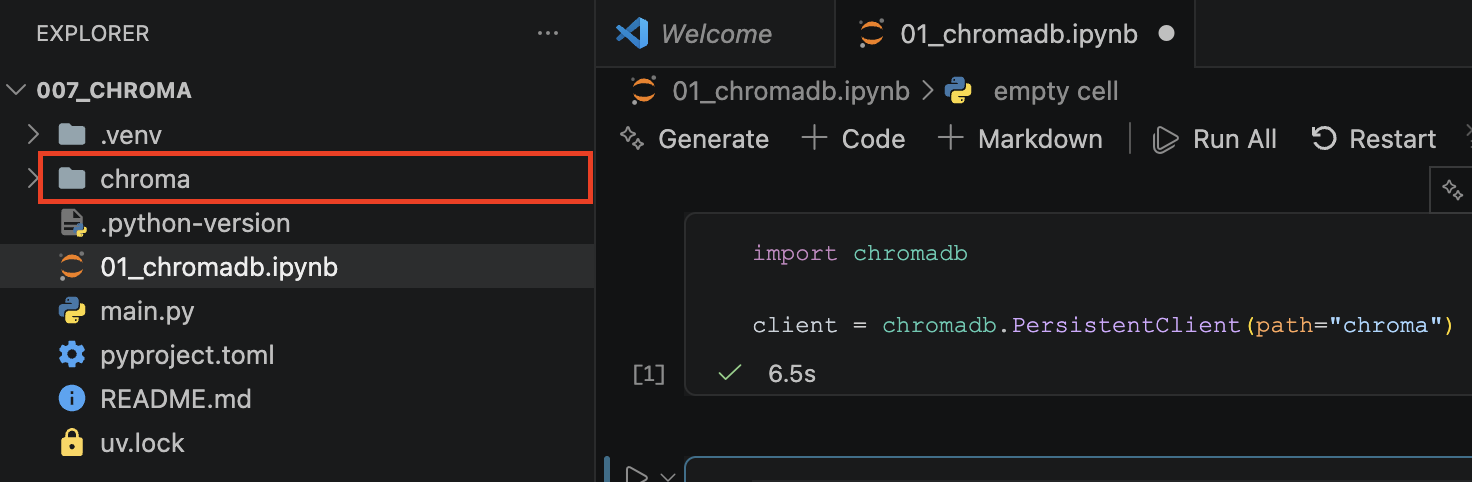
client = chromadb.PersistentClient(path="chroma")
- 실행하면 아래처럼 디렉터리가 생성된다.
1. 컬렉션 생성
(1) 컬렉션 생성 규칙
- collection의
create_collection()메서드를 이용한다. - 컬렉션 이름의 길이 : 3자 ~ 512자 사이여야 한다.
- 컬렉션 이름의 시작과 끝 : 영문 소문자 또는 숫자로 시작하고 끝나야 한다.
- 사용 가능한 문자 : 영문 소문자, 숫자, 마침표, 하이픈, 언더스코어
- 불가능한 경우 : 마침표를 연속하여 두 개 이상 사용하는 경우, 유효한 IP 주소
- 크로마 데이터베이스 내에서 컬렉션 이름은 유일해야 함
(2) 컬렉션 메타데이터
- 컬렉션을 생성할 때
키-값쌍의 데이터를 메타데이터를 추가할 수 있다. - 예 : 설명, 생성일, 소유자 등
(3) Embedding Function
- 컬렉션에 Embedding Function을 할당해둘 수 있다.
- 이 경우, 문서가 저장되면 자동으로 임베딩이 수행되어 벡터가 저장된다.
- 자세한 내용 : https://docs.trychroma.com/docs/embeddings/embedding-functions
| Embedding Function | 모델 / 방법 | 사용 방법 |
|---|---|---|
| Default Embedding Function | Sentence Transformers 의 all-MiniLM-L6-L2 모델 |
create_collection() 메서드 사용시 별도 지정을 하지 않는다. |
| OpenAI Embedding API | OpenAI의 Embedding API 모델 중 선택 | chromadb.utils.embedding_functions.OpenAIEmbeddingFunction |
| 직접 입력 | 크로마 외부에서 임베딩한 벡터를 직접 저장 | embedding_function = None 으로 설정 |
| 그 외 다수 존재 |
(4) 컬렉션 생성 코드
client.create_collection()메서드를 이용해 컬렉션을 생성한다.client.get_or_create_collection()메서드는 해당 이름의 컬렉션이 없는 경우에만 컬렉션을 생성한다.
1
2
3
4
5
6
7
8
9
10
11
from datetime import datetime

collection_name = "dummy_collection"
collection = client.create_collection(
    name = collection_name,
    metadata = {
        "description": "테스트용 컬렉션",
        "created": datetime.now().strftime("%Y-%m-%d %H:%M:%S")
        # embedding_function 미지정, 기본 임베딩 모델 사용
    }
)
2. 컬렉션 가져오기
(1) get_collection()
- 컬렉션의 이름으로 Chroma 컬렉션을 가져오는 방법
1
collection = client.get_collection(name="dummy_collection")
(2) get_or_create_collection()
- 컬렉션의 이름으로 Chroma 컬렉션을 가져오려고 시도한다.
- 해당 이름의 컬렉션이 존재하지 않으면 컬렉션을 생성하며, 존재하는 경우엔 가져온다.
1
2
3
4
collection = client.get_or_create_collection(
    name="dummy_collection",
    metadata={"description": "..."}
)
(3) list_collections()
- Chroma 데이터베이스에 있는 컬렉션 목록을 반환한다.
- 생성 시간 순으로 오래된 것부터 최신순으로 정렬되며, 기본적으로 최대 100개를 반환한다.
limit,offset파라미터를 통해 가져오는 개수와 시작점을 조정할 수 있다.
1
2
3
4
collection_list_100 = client.list_collections()
first_collections_batch = client.list_collections(limit=100) # get the first 100 collections
second_collections_batch = client.list_collections(limit=100, offset=100) # get the next 100 collections
collections_subset = client.list_collections(limit=20, offset=50) # get 20 collections starting from the 50th
3. 컬렉션 수정
collection.modify()메서드를 이용해 컬렉션의 이름과 메타데이터를 수정할 수 있다.
1
2
3
4
5
6
7
collection.modify(
    name = "new_name_collection",
    metadata = {
        "description": "수정된 더미 컬렉션",
        "created": datetime.now().strftime("%Y-%m-%d %H:%M:%S")
    }
)
4. 컬렉션 삭제
client.delete_collection()메서드를 사용해 컬렉션을 삭제한다.
1
2
3
4
client.delete_collection(name = "new_name_collection")
print(client.list_collections())

# >> []
5. 기타 기능
heartbeat(): 클라이언트의 연결 상태 체크
1
client.heartbeat()
reset(): 데이터베이스를 완전히 비우고 초기화(복구 불가)
1
client.reset()
데이터 관리
1. 데이터 추가
collection.add()메서드를 통해 컬렉션에 데이터를 추가할 수 있다.- 데이터는
ids,embeddings,documents,metadatas항목을 포함할 수 있다. - 이 중
ids는 항상 필수,embeddings와documents중 하나는 필수
| 항목 | 설명 |
|---|---|
| ids | 각 레코드(데이터, 또는 아이템)을 식별하는 고유한 문자열 |
| embeddings | 저장하려는 벡터 값 |
| documents | 저장하려는 벡터 값에 대한 원본 데이터(문서 내용 등) |
| metadatas | 레코드에 대한 부가 데이터로, 문자열, 정수, 부동 소수점 또는 부울형 및 이들을 포함한 배열 |
1
2
3
4
5
6
7
8
9
10
11
12
13
14
15
16
collection.add(
    ids = ["id_1", "id_2", "id_3"],
    documents = [
        "산토끼 토끼야 어디를 가느냐",
        "동해물과 백두산이 마르고 닳도록",
        "메타데이터 값은 문자열, 정수, 부동 소수점..."
    ],
    # embeddings 생략, 기본 임베딩 펑션으로 임베딩 수행
    metadatas = [
        {"version":2, "tags":["song", "rabbit"], "length":15},
        {"version":1, "tags":["song", "korea"], "length":17},
        {"version":3, "tags":["docs", "chroma"], "length":27},
    ]
)

# embeddings 가 생략됐으므로, 컬렉션 내장 embedding_function으로 임베딩이 수행된다.
2. 데이터 살펴보기
collection.count(): 컬렉션에 존재하는 레코드 수를 반환
1
2
collection.count()
# >> 3
collection.peek(): 컬렉션에서 처음 10개의 레코드를 반환
1
collection.peek()
1
2
3
4
5
6
7
8
9
10
11
12
13
14
15
16
{'ids': ['id_1', 'id_2', 'id_3'],
 'embeddings': array([[-0.04108747,  0.10813117,  0.07150935, ...,  0.08907343,
         -0.01958624, -0.02936401],
        [ 0.02559765,  0.09667307,  0.06856398, ...,  0.0150672 ,
         -0.02860714, -0.00113158],
        [ 0.02281495,  0.09216131,  0.0318673 , ...,  0.01117194,
         -0.06264631,  0.03663968]], shape=(3, 384)),
 'documents': ['산토끼 토끼야 어디를 가느냐',
  '동해물과 백두산이 마르고 닳도록',
  '메타데이터 값은 문자열, 정수, 부동 소수점...'],
 'uris': None,
 'included': ['metadatas', 'documents', 'embeddings'],
 'data': None,
 'metadatas': [{'length': 15, 'tags': ['song', 'rabbit'], 'version': 2},
  {'tags': ['song', 'korea'], 'length': 17, 'version': 1},
  {'version': 3, 'tags': ['docs', 'chroma'], 'length': 27}]}
3. 데이터 업데이트
(1) update
collection.update()메서드를 이용해 데이터를 업데이트한다.- 존재하지 않는 id를 수정하려고 할 경우, 업데이트가 수행되지 않는다.
- collection이 embedding_function 을 가지고 있고, update로 document만 주는 경우, 해당 document에 대한 embedding 값이 자동 업데이트 되어 저장된다.
1
2
3
4
collection.update(
    ids = ["id_1"],
    documents = ["깡총 깡총 뛰면서 어디를 가느냐"]
)
1
2
3
4
5
6
7
8
9
10
11
12
# peek 로 출력해보면
{'ids': ['id_1', 'id_2', 'id_3'],
 'embeddings': array([[-0.0319076 ,  0.10399871,  0.06240996, ...,  0.09365599,
         -0.0157473 , -0.02465512],
        [ 0.02559765,  0.09667307,  0.06856398, ...,  0.0150672 ,
         -0.02860714, -0.00113158],
        [ 0.02281495,  0.09216131,  0.0318673 , ...,  0.01117194,
         -0.06264631,  0.03663968]], shape=(3, 384)),
 'documents': ['깡총 깡총 뛰면서 어디를 가느냐',
  '동해물과 백두산이 마르고 닳도록',
  '메타데이터 값은 문자열, 정수, 부동 소수점...'],
...
(2) upsert
collections.upsert()메서드를 이용해 데이터를 업데이트하거나 추가 삽입할 수 있다.- id가 collection에 존재하는 경우에는 update와 동일하게 작동하며
- id가 collection에 없는 경우에는 add와 동일하게 작동한다.
1
2
3
4
collection.upsert(
    ids = ["id_1", "id_4"],
    documents = ["깊은산속 옹달샘", "Hello, World!"]
)
1
2
3
4
5
6
7
8
# peek로 출력해보면
{'ids': ['id_1', 'id_2', 'id_3', 'id_4'],
...
 'documents': ['깊은산속 옹달샘',
  '동해물과 백두산이 마르고 닳도록',
  '메타데이터 값은 문자열, 정수, 부동 소수점...',
  'Hello, World!'],
...
4. 데이터 삭제
collections.delete()메서드와id값을 이용해 데이터를 삭제할 수 있다.
1
collection.delete(ids = ["id_3"])
1
2
# collection.peek()["ids"] 로 데이터 확인
['id_1', 'id_2', 'id_4']
- 또는,
where를 통해 필터링을 통한 삭제 대상 지정도 가능하다.
1
collection.delete(where = {"version":2})
1
2
# collection.peek()["ids"] 로 데이터 확인
['id_2', 'id_4']
검색
0. 들어가기 전에
- 실습 데이터 변경 : 컬렉션의 모든 문서를 지운 뒤, 아래 문서들을 추가했음
1
2
3
4
5
6
7
8
9
10
11
12
13
14
15
16
17
18
19
20
21
22
23
collection.add(
    ids = [f"id_{i}" for i in range(1, 11)],
    documents = [
        "Seoul has cold winters.",
        "Busan is famous for seafood.",
        "Jeju is often windy.",
        "Libraries require silence.",
        "Phones should be on silent.",
        "Subway cards give transfer discounts.",
        "Train tickets sell out quickly.",
        "Lower brightness saves battery.",
        "Old photos take up storage.",
        "Camping needs warm clothes.",
    ],
    metadatas = [
        {"city":"seoul", "view":10},
        {"city":"busan", "view":1},
        {"city":"jeju", "view":50, "keywords":["jeju", "weather"]},
        {"view":100, "keywords" : ["caution", "library"]},
        {"view":90,  "keywords" : ["caution", "phone"]},
        {"view":60}, {"view":876}, {"view":32}, {"view":12}, {"view":76}
    ]
)
1. Query
(0) 문법과 검색결과 형태
collection.query()메서드를 이용해 유사성(similarity)에 기반한 검색을 수행할 수 있다.
| 파라미터 | 설명 | 비고 |
|---|---|---|
query_texts |
자연어 질문 목록을 통한 검색 | collection에 embedding_function이 있는 경우 |
query_embeddings |
직접 임베딩한 값을 검색에 이용 | |
n_results |
반환받을 검색 결과 개수 지정 | 기본값은 10 |
ids |
검색 대상 문서 범위 지정 | |
where |
메타데이터로 필터링 | |
where_document |
텍스트 검색 또는 정규표현식 검색 |
1
2
3
4
5
6
7
8
collection.query(
    query_embeddings=[["-6.77785128e-02", "1.87601356e-04", "3.26236933e-02"...]],
    query_texts=["How about you?"],
    n_results=30,
    ids=["id_1", "id_2"],
    where={"page": 10},
    where_document={"$contains": "search string"}
)
- Query 의 검색 결과 형태
1
2
3
4
5
6
7
8
class QueryResult(TypedDict):
    ids: List[IDs]
    embeddings: Optional[List[Embeddings]]
    documents: Optional[List[List[Document]]]
    uris: Optional[List[List[URI]]]
    metadatas: Optional[List[List[Metadata]]]
    distances: Optional[List[List[float]]]
    included: Include
(1) query_texts
- 자연어 질문 목록을 통한 검색
- collection 에 세팅된 embedding_function 을 통해 임베딩된 후 검색된다.
1
collection.query(query_texts=["Weather is so cold", "i love seoul"])
1
2
3
4
5
6
7
8
9
10
11
# 검색결과
{"ids": [
    ["id_1", "id_10", "id_3" ...],
    ["id_1", "id_6", "id_2" ...],
  ],
 "documents": [
    ['Seoul has cold winters.', 'Camping needs warm clothes.' ...],
    ['Seoul has cold winters.', 'Subway cards give transfer discounts.'...],
  ],
  ...
}
(2) query_embeddings
- 외부에서 직접 임베딩한 벡터로 검색을 하는 경우
1
2
3
4
5
6
# 임베딩
question = "What should be kept in mind at the library?"
embedded = collection._embedding_function(question)[0]
print(embedded)

>> array([-6.77785128e-02,  1.87601356e-04,  3.26236933e-02,...])
1
2
# 검색
collection.query(query_embeddings=embedded)
1
2
3
4
5
6
7
8
9
# 검색결과
{"ids": [
    ["id_4", "id_7", "id_9" ...]
  ],
 "documents": [
    ['Libraries require silence.', 'Train tickets sell out quickly.'...],
  ],
  ...
}
2. Get
(0) 문법과 검색 결과 형태
- 유사도 계산 없이 id 또는 메타데이터를 기준으로 필터링된 검색 결과를 가져오는 검색 방법
collection.get()메서드를 이용한다.
| 파라미터 | 설명 | 비고 |
| — | — | — |
| ids | 지정한 아이디 목록에 해당하는 문서를 필터링해 가져옴 | |
| where | 메타데이터를 이용한 필터링 | |
| limit | 지정한 개수의 문서를 가져옴 | offset 과 함께 사용해 pagination |
| offset | 지정한 지점부터 문서를 가져옴 | limit 과 함께 사용해 pagination |
- Get의 검색 결과 형태
1
2
3
4
5
6
7
class GetResult(TypedDict):
    ids: List[ID]
    embeddings: Optional[Embeddings]
    documents: Optional[List[Document]]
    uris: Optional[URIs]
    metadatas: Optional[List[Metadata]]
    included: Include
(1) id로 필터링
1
collection.get(ids=["id_1", "id_5"])
1
2
3
4
5
6
7
{'ids': ['id_1', 'id_5'],
 'embeddings': None,
 'documents': ['Seoul has cold winters.', 'Phones should be on silent.'],
 'uris': None,
 'included': ['metadatas', 'documents'],
 'data': None,
 'metadatas': [None, None]}
그 외 메타데이터를 이용한 필터링은 다음 섹션에서 살펴본다.
3. 메타데이터 필터링
(0) 문법
- 각 문서의 메타데이터를 기준으로 필터링하는 방법
.get()메서드와.query()메서드에서 사용할 수 있으며,where라는 파라미터를 사용한다.- where 파라미터에
{메타데이터필드이름:필터링값}의 dictionary 형태의 값을 전달한다.
1
2
3
4
collection.query(
    query_texts=["first query", "second query"],
    where={"page": 10}
)
(1) “정확한 일치” 필터링
{메타데이터필드이름:필터링값}와 같은 기본 형태 또는,$eq키워드를 사용해 정확한 일치 필터링을 표현한다.
1
2
3
4
5
6
7
8
9
10
11
12
13
14
15
# 첫 번째 방법
collection.get(
    where = {
        "city":"seoul"
    }
)

# 두 번째 방법
collection.get(
    where = {
        "city": {
            "$eq" : "seoul"
            }
    }
)
1
2
3
4
5
6
7
8
# 결과
{'ids': ['id_1'],
 'embeddings': None,
 'documents': ['Seoul has cold winters.'],
 'uris': None,
 'included': ['metadatas', 'documents'],
 'data': None,
 'metadatas': [{'view': 10, 'city': 'seoul'}]}
(2) 초과 / 미만 필터링
$gt또는$lt키워드를 이용하면 초과, 미만 필터링도 가능하다.- 숫자형 (int, float) 에만 적용할 수 있다.
1
2
3
4
5
# 숫자 초과 / 미만
collection.query(
    query_texts=["some text"],
    where = {"view" : {"$lt":30}}
)
1
2
3
4
5
6
7
8
{'ids': [['id_9', 'id_1', 'id_2']],
 'embeddings': None,
 'documents': [['Old photos take up storage.','Seoul has cold winters.','Busan is famous for seafood.']],
 'uris': None,
 'included': ['metadatas', 'documents', 'distances'],
 'data': None,
 'metadatas': [[{'view': 12},{'view': 10, 'city': 'seoul'},{'city': 'busan', 'view': 1}]],
 'distances': [[1.7070887088775635, 1.8459572792053223, 1.8709619045257568]]}
(3) and / or 조건
$and키워드와 조건셋 리스트를 함께 사용해 and 조건 필터링이 가능하다.
1
2
3
4
5
6
7
8
9
collection.query(
    query_texts=["some text"],
    where = {
        "$and":[
            {"view" : {"$lt":30}},
            {"view" : {"$gt":5}}
            ]
    }
)
1
2
3
4
5
6
7
8
{'ids': [['id_9', 'id_1']],
 'embeddings': None,
 'documents': [['Old photos take up storage.', 'Seoul has cold winters.']],
 'uris': None,
 'included': ['metadatas', 'documents', 'distances'],
 'data': None,
 'metadatas': [[{'view': 12}, {'city': 'seoul', 'view': 10}]],
 'distances': [[1.7070887088775635, 1.8459572792053223]]}
- or 조건 필터링을 위해서는
$or키워드와 조건셋 리스트를 사용하면 된다. (복합도 가능)
1
2
3
4
5
6
7
8
9
10
11
12
collection.get(
    where = {
        "$or" : [
            {"city" : "seoul"}, # city 가 seoul이거나
            {"$and" : [         # view 가 50초과 80미만인 경우
                {"view" : {"$gt" : 50}},
                {"view" : {"$lt" : 80}}
            ]
             }
        ]
    }
)
(4) 포함됨 / 불포함됨 조건 (in / not in)
$in,$nin키워드를 이용해 포함/불포함 조건을 설정할 수 있다.
1
2
3
4
5
6
# in
collection.get(
    where = {
        "city" : {"$in" : ["seoul", "busan"]}
    }
)
1
2
3
4
5
collection.get(
    where = {
        "city" : {"$nin" : ["seoul", "busan"]}
    }
)
(5) 포함함 / 불포함함 조건 (contains / not contains)
- 배열 형태의 메타데이터를 가지고 있는 경우
- 배열 메타데이터가 제시하는 조건값을 포함하는 문서를 필터링한다.
1
2
3
4
5
6
7
collection.get(
    where = {
        "keywords" : {
            "$contains" : "caution"
        }
    }
)
1
2
3
4
5
6
7
8
{'ids': ['id_4', 'id_5'],
 'embeddings': None,
 'documents': ['Libraries require silence.', 'Phones should be on silent.'],
 'uris': None,
 'included': ['metadatas', 'documents'],
 'data': None,
 'metadatas': [{'view': 100, 'keywords': ['caution', 'library']},
  {'view': 90, 'keywords': ['caution', 'phone']}]}
4. 텍스트 검색
(0) 문법
- 문서 내용(텍스트)에 대한 검색을 수행한다.
.get()메서드와.query()메서드에서 사용할 수 있으며,where_document라는 파라미터를 사용한다.- full text search :
$contains또는$not_contains키워드를 사용해 특정 텍스트가 포함된 문서를 검색한다. - regular expression :
$regex또는$not_regex키워드를 사용해 정규표현식을 만족하는 문서를 검색한다.
1
2
3
4
5
6
7
8
9
10
11
# 전체 텍스트 일치 검색
collection.get(
   where_document={"$contains": "search string"}
)

# 정규표현식 검색
collection.get(
   where_document={
       "$regex": "^[a-zA-Z0-9._%+-]+@[a-zA-Z0-9.-]+\.[a-zA-Z]{2,}$"
   }
)
Reference
https://docs.trychroma.com/docs/overview/getting-started
https://docs.trychroma.com/reference/architecture/overview
https://docs.trychroma.com/docs/run-chroma/clients
https://docs.trychroma.com/docs/run-chroma/client-server
https://docs.trychroma.com/docs/embeddings/embedding-functions
https://docs.trychroma.com/docs/collections/manage-collections
https://docs.trychroma.com/docs/collections/add-data
https://docs.trychroma.com/docs/collections/update-data
https://docs.trychroma.com/docs/collections/delete-data
https://docs.trychroma.com/docs/querying-collections/query-and-get#query
https://docs.trychroma.com/docs/querying-collections/query-and-get#get
https://docs.trychroma.com/docs/querying-collections/metadata-filtering
https://docs.trychroma.com/docs/querying-collections/full-text-search
// reading compass
이 글과 이어지는 경로
시리즈, 카테고리, 태그 겹침, 최신도를 점수화해 가까운 글일수록 중심에 배치합니다.
댓글 남기기