
docker를 이용한 mlflow tracking server 설치
1. 설치 항목
- (1) MLflow Tracking Server
MLflow Tracking 관련 기능 REST API 제공 및 UI 제공
- (2) Backend Store(PostgreSQL)
MLflow의 메타데이터를 저장하는 Backend DB
- (3) Artifact Store(RustFS)
훈련된 모델 파일과 실행의 결과물 등을 저장하는 Artifact Store
2. 사전 준비
- Git
- Docker Engine과 Docker Compose Plugin
- OS : docker 실행이 가능한 linux 계열 또는 docker desktop
3. Docker-Compose 준비
(1) 표준 docker compose 파일 준비
- https://github.com/mlflow/mlflow/blob/master/docker-compose/docker-compose.yml
- 위 URL에서 표준 Docker Compose 설정 파일을 확인할 수 있음
(2) docker compose의 서비스 목록
- 서비스
| 서비스 | 역할 | 설명 |
|---|---|---|
| postgres | backend store | MLflow Tracking Server의 백엔드 스토어. 메타데이터 저장. 기본 이미지는 PostgreSQL의 15버전 |
| storage | artifact store | MLflow Tracking Server의 아티팩트 스토어. 훈련된 모델 파일 등 저장. 기본 이미지는 RustFS:1.0.0 |
| create-bucket | artifact store init | 아티팩트 스토어의 초기화 작업 컨테이너. 완료 후 종료됨. 기본 이미지는 amazon/aws-cli |
| mlflow | mlflow tracking server | Tracking Server의 API 및 UI 제공. 기본 이미지는 ghcr.io/mlflow/mlflow |
- 도커 볼륨
| 볼륨 | 역할 | 설명 |
|---|---|---|
| pgdata | backend store mount | 백엔드 스토어를 호스트에 마운트한 볼륨 |
| storage-data | artifact store mount | 아티팩트 스토어를 호스트에 마운트한 볼륨 |
4. 환경 설정
(1) 주요 항목
- 주요 항목은
.env.dev.example파일에서 확인할 수 있다.
| 항목 | 설명 | 예시값 |
|---|---|---|
| POSTGRES_USER | Backend Store 계정이름 | mlflow |
| POSTGRES_PASSWORD | Backend Store 비밀번호 | mlflow |
| POSTGRES_DB | Backend Store DB명 | mlflow |
| AWS_ACCESS_KEY_ID | S3호환 아티팩트 서버 KEY ID | s3admin |
| AWS_SECRET_ACCESS_KEY | S3호환 아티팩트 서버 키 | s3admin |
| AWS_DEFAULT_REGION | S3호환 아티팩트 서버 리전값 | us-east-1 |
| RUSTFS_CONSOLE_ENABLE | 아티팩트스토어 CLI 사용 여부 | true |
| S3_BUCKET | 아티팩트스토어 버킷 이름 | mlflow |
| MLFLOW_VERSION | 사용할 MLflow Tracking Server 버전 | 3.10.1-full |
| MLFLOW_HOST | MLflow Tracking Server 접근 | 0.0.0.0 |
| MLFLOW_PORT | MLflow Tracking Server 포트 | 5000 |
| MLFLOW_BACKEND_STORE_URI | MLflow Tracking Server에서 바라볼 백엔드 스토어 경로 | postgresql://..(하단 참조) |
| MLFLOW_ARTIFACTS_DESTINATION | MLflow Tracking Server에서 바라볼 아티팩트 스토어 경로 | s3://${S3_BUCKET} |
| MLFLOW_S3_ENDPOINT_URL | MLflow Tracking Server에서 바라볼 아티팩트 스토어 포트 | http://storage:9000 |
(2) docker compose 파일
1
2
3
4
5
6
7
8
9
10
11
12
13
14
15
16
17
18
19
20
21
22
23
24
25
26
27
28
29
30
31
32
33
34
35
36
37
38
39
40
41
42
43
44
45
46
47
48
49
50
51
52
53
54
55
56
57
58
59
60
61
62
63
64
65
66
67
68
69
70
71
72
73
74
75
76
77
78
79
80
81
82
83
84
85
86
87
88
89
90
91
92
93
94
95
96
97
98
99
100
101
102
103
104
105
106
107
108
109
110
111
112
113
114
115
116
117
118
119
120
121
122
123
124
volumes:
  mlflow-pgdata:
  mlflow-storage-data:

services:
  mlflow-postgres:
    image: postgres:15
    container_name: mlflow-postgres
    environment:
      POSTGRES_USER: ${POSTGRES_USER}
      POSTGRES_PASSWORD: ${POSTGRES_PASSWORD}
      POSTGRES_DB: ${POSTGRES_DB}
    volumes:
      - mlflow-pgdata:/var/lib/postgresql/data
    ports:
      - "${POSTGRES_PORT}:5432"
    healthcheck:
      test: ["CMD-SHELL", "pg_isready -U ${POSTGRES_USER} -d ${POSTGRES_DB}"]
      interval: 5s
      timeout: 3s
      retries: 10

  mlflow-storage:
    image: rustfs/rustfs:1.0.0-alpha.83
    container_name: mlflow-storage
    environment:
      RUSTFS_ADDRESS: :9000
      RUSTFS_SERVER_DOMAINS: mlflow-storage:9000
      RUSTFS_REGION: ${AWS_DEFAULT_REGION:-us-east-1}
      RUSTFS_ACCESS_KEY: ${AWS_ACCESS_KEY_ID:-s3admin}
      RUSTFS_SECRET_KEY: ${AWS_SECRET_ACCESS_KEY:-s3admin}
      RUSTFS_CONSOLE_ENABLE: ${RUSTFS_CONSOLE_ENABLE:-true}
    ports:
      - "${RUSTFS_ENDPOINT_PORT}:9000"
      - "${RUSTFS_MANAGING_PORT}:9001"
    volumes:
      - mlflow-storage-data:/data
    restart: unless-stopped
    healthcheck:
      test: ["CMD-SHELL", 'curl -s http://127.0.0.1:9000/health | grep -q ''"status":"ok"''']
      interval: 10s
      timeout: 5s
      retries: 5
      start_period: 10s

  create-bucket:
    image: amazon/aws-cli:2.33.25
    container_name: mlflow-create-bucket
    depends_on:
      mlflow-storage:
        condition: service_healthy
    entrypoint: >
      /bin/sh -c "
        set -e;
        echo 'Waiting for S3 gateway getting ready...';
        if aws --endpoint-url=${MLFLOW_S3_ENDPOINT_URL} s3api head-bucket --bucket ${S3_BUCKET} 2>/dev/null; then
          echo 'Bucket ${S3_BUCKET} already exists. Skipping creation.';
        else
          echo 'Creating bucket ${S3_BUCKET}...';
          aws --endpoint-url=${MLFLOW_S3_ENDPOINT_URL} s3api create-bucket --bucket ${S3_BUCKET} --region ${AWS_DEFAULT_REGION};
        fi
      "
    environment:
      AWS_ACCESS_KEY_ID: ${AWS_ACCESS_KEY_ID}
      AWS_SECRET_ACCESS_KEY: ${AWS_SECRET_ACCESS_KEY}
      AWS_DEFAULT_REGION: ${AWS_DEFAULT_REGION}
      AWS_S3_ADDRESSING_STYLE: path
      MLFLOW_S3_ENDPOINT_URL: ${MLFLOW_S3_ENDPOINT_URL}
      S3_BUCKET: ${S3_BUCKET}
    restart: "no"

  mlflow:
    image: ghcr.io/mlflow/mlflow:${MLFLOW_VERSION}
    container_name: mlflow-server
    depends_on:
      mlflow-postgres:
        condition: service_healthy
      mlflow-storage:
        condition: service_healthy
      create-bucket:
        condition: service_completed_successfully
    environment:
      # Backend store URI built from vars
      MLFLOW_BACKEND_STORE_URI: ${MLFLOW_BACKEND_STORE_URI}

      # S3/RustFS settings
      MLFLOW_S3_ENDPOINT_URL: ${MLFLOW_S3_ENDPOINT_URL}
      MLFLOW_ARTIFACTS_DESTINATION: ${MLFLOW_ARTIFACTS_DESTINATION}
      AWS_ACCESS_KEY_ID: ${AWS_ACCESS_KEY_ID}
      AWS_SECRET_ACCESS_KEY: ${AWS_SECRET_ACCESS_KEY}
      AWS_DEFAULT_REGION: ${AWS_DEFAULT_REGION}
      MLFLOW_S3_IGNORE_TLS: "true"

      # Server host/port
      MLFLOW_HOST: ${MLFLOW_HOST}
      MLFLOW_PORT: ${MLFLOW_PORT}
    command:
      - /bin/bash
      - -c
      - |
        pip install --no-cache-dir psycopg2-binary boto3
        mlflow server \
          --backend-store-uri "${MLFLOW_BACKEND_STORE_URI}" \
          --artifacts-destination "${MLFLOW_ARTIFACTS_DESTINATION}" \
          --serve-artifacts \
          --host "${MLFLOW_HOST}" \
          --port "${MLFLOW_PORT}"
    ports:
      - "${MLFLOW_PORT}:${MLFLOW_PORT}"
    healthcheck:
      test:
        [
          "CMD",
          "python",
          "-c",
          "import urllib.request; urllib.request.urlopen('http://localhost:${MLFLOW_PORT}/health')",
        ]
      interval: 10s
      timeout: 5s
      retries: 30

networks:
  default:
    name: mlflow-network
(3) env 파일
1
2
3
4
5
6
7
8
9
10
11
12
13
14
15
16
17
18
19
20
21
22
23
24
25
26
27
# .env 파일

# PostgreSQL
POSTGRES_USER=mlflow
POSTGRES_PASSWORD=mlflow
POSTGRES_DB=mlflow
POSTGRES_PORT=5432

# S3 Credentials
AWS_ACCESS_KEY_ID=mlflow
AWS_SECRET_ACCESS_KEY=mlflow
AWS_DEFAULT_REGION=us-east-1

# RustFS
RUSTFS_CONSOLE_ENABLE=true
S3_BUCKET=mlflow
RUSTFS_ENDPOINT_PORT=9000
RUSTFS_MANAGING_PORT=9001

# MLflow
MLFLOW_VERSION=v3.10.1-full
MLFLOW_HOST=0.0.0.0
MLFLOW_PORT=5000

MLFLOW_BACKEND_STORE_URI=postgresql://${POSTGRES_USER}:${POSTGRES_PASSWORD}@mlflow-postgres:5432/${POSTGRES_DB}
MLFLOW_ARTIFACTS_DESTINATION=s3://${S3_BUCKET}
MLFLOW_S3_ENDPOINT_URL=http://mlflow-storage:${RUSTFS_ENDPOINT_PORT}
5. 설치 및 실행
docker compose up명령어로 서비스들(컨테이너들)을 실행한다.
1
docker compose up
- 브라우저를 통해 각 서비스에 접속해본다.
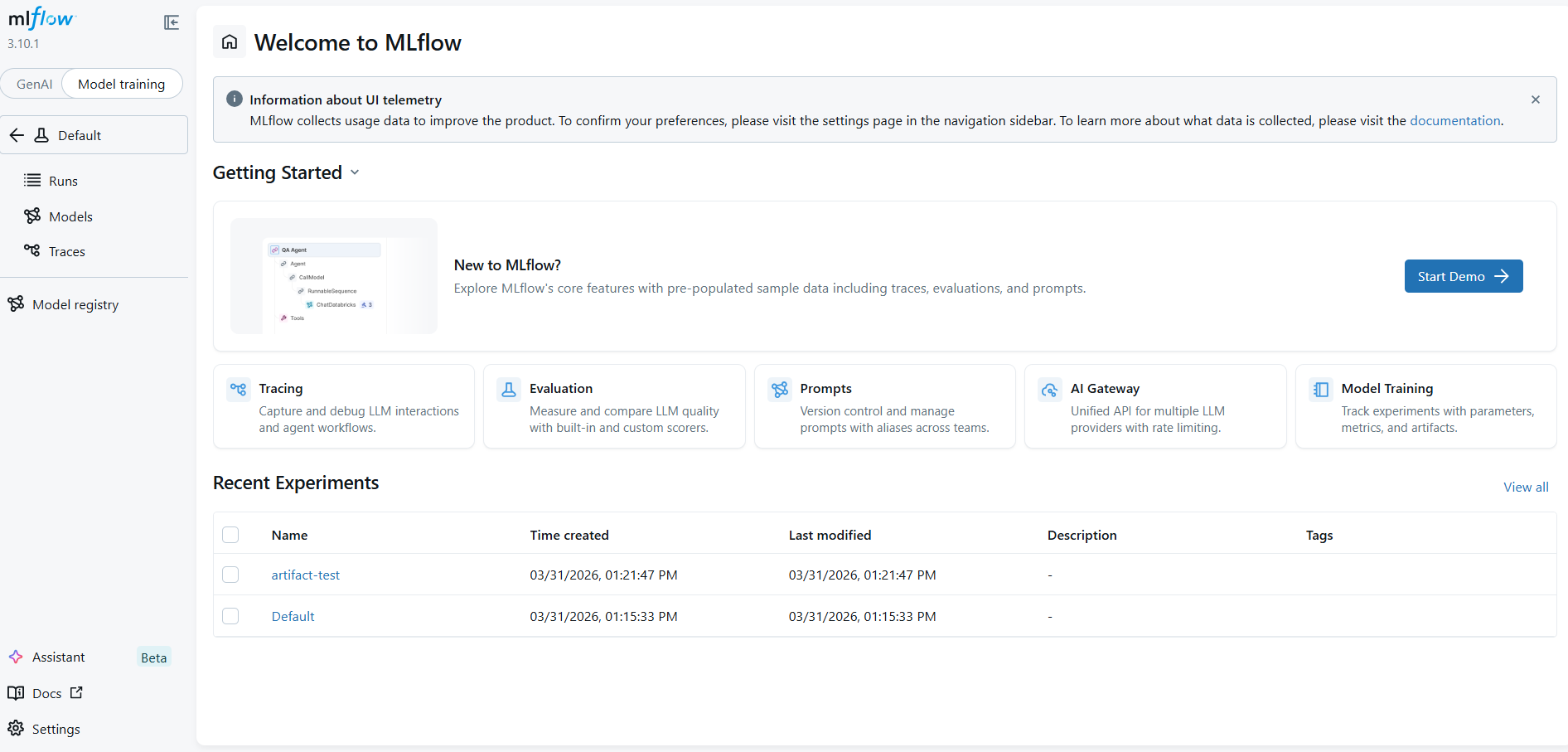
- 가장 먼저 mlflow tracking server는
http://localhost:5000로 UI 접근이 가능하다.서버 실행하는 위치에 따라 localhost를 서버가 띄워진 IP로 변경해주면 된다.
- 아티팩트 스토어인 RustFS는
http://localhost:9001로 UI 접근이 가능하다.서버 실행하는 위치에 따라 localhost를 서버가 띄워진 IP로 변경해주면 된다.
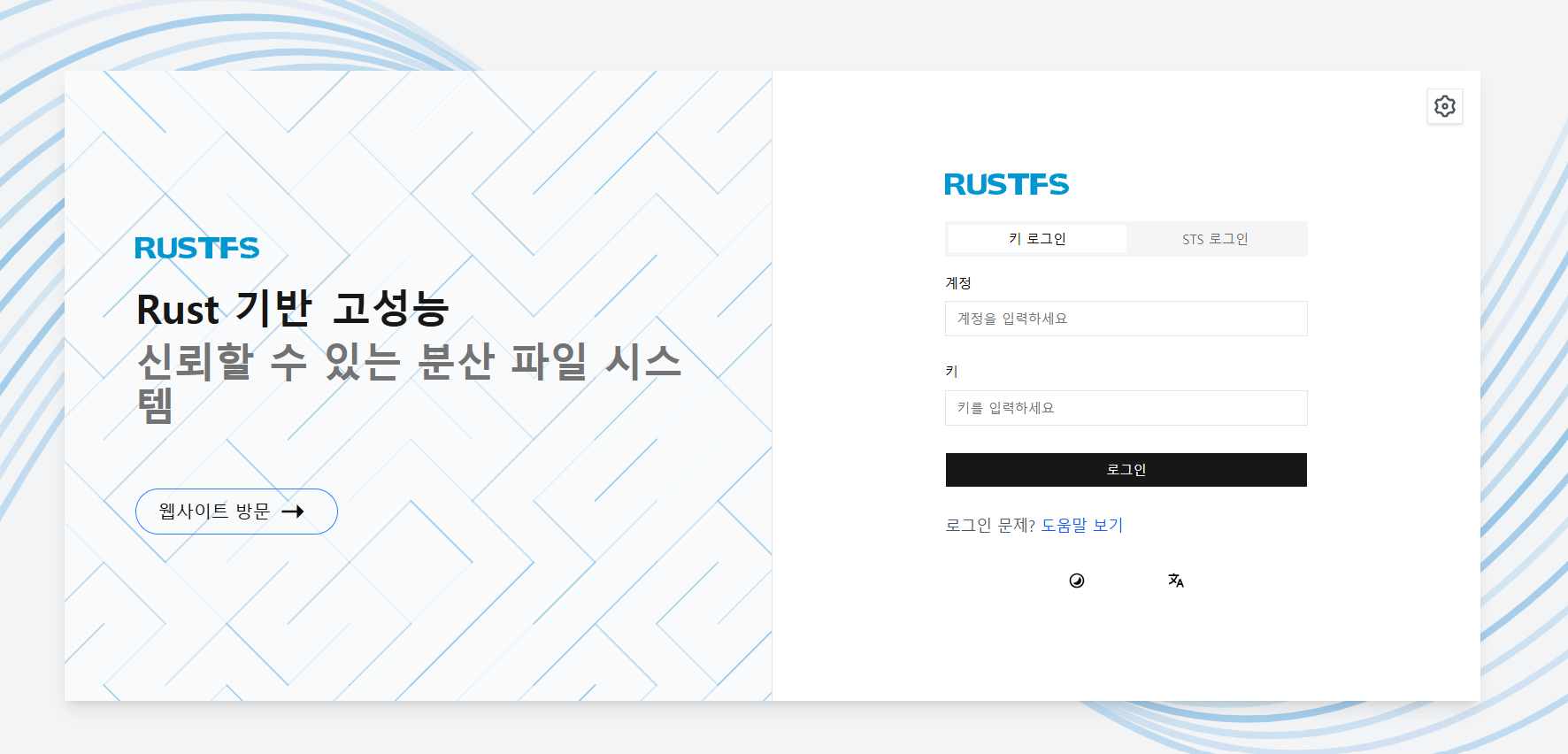
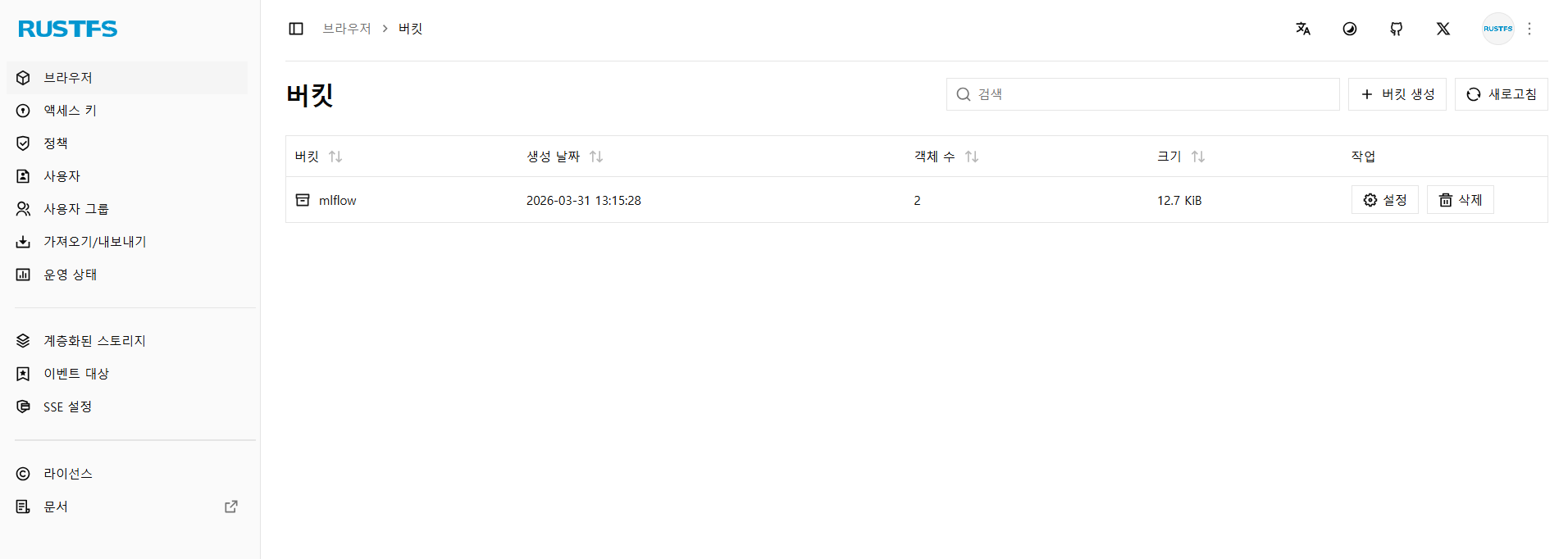
- 계정은 env 파일에 설정한 AWS_ACCESS_KEY_ID, AWS_SECRET_ACCESS_KEY에 해당한다.
- 로그인을 하면 아래와 같은 화면을 볼 수 있다.
Reference
https://github.com/mlflow/mlflow/tree/master/docker-compose
https://github.com/mlflow/mlflow/pkgs/container/mlflow
Comments