
애플 앱스토어 앱 리뷰 스크래퍼
앱 리뷰(최근 500개)를 스크래핑하는 python 코드입니다. Beautifulsoup, urllib, pandas를 이용했습니다.
Intro
한국의 대표 알람 앱, 알라미의 리뷰들을 보고 싶은 데서 이번 실험은 시작됐다.
알라미는 딜라이트룸에서 개발한 앱으로, 2022년 기준 매출 192억원(!!!)을 낸,
전세계적으로 사랑받고 있는 알람 앱이다.
나도 꽤 오래전부터 이 알람 앱을 이용해왔고, 정말 좋은 앱이라고 생각한다.
스마트폰 앱스토어에서는 리뷰를 볼 수는 있지만 스크랩하기 어렵고,
웹에서는 제한된 숫자(약 30개)의 리뷰만을 볼 수 있어,
많은 리뷰를 한 번에 보기는 어렵다.
이에 최근 작성된 500개의 리뷰를 볼 수 있게 제공된 XML을 이용해 스크래퍼를 만들어보았고,
(1) 알라미 앱 뿐만 아니라 다른 앱의 리뷰도 스크래핑 할 수 있고
(2) 한국 뿐 아니라 다른 나라의 리뷰도 볼 수 있는 스크래퍼로 발전시켜보았다.
코드 git repository
https://github.com/whdrns2013/lab/tree/main/20230129_apple_app_review_scrapper
Environment
이번 실험에서 사용된 환경과 라이브러리는 아래와 같다.
- Python 3.8
- BeautifulSoup
- urllib
- pandas
Elements
리뷰 xml
앱스토어의 앱 리뷰 xml 경로는 아래와 같은 규칙을 가지고 있다.
https://itunes.apple.com/{country}/rss/customerreviews/page={page}/id={app_id}/sortby=mostrecent/xml?urlDesc=/customerreviews/id={app_id}/sortBy=mostRecent/xml
예를 들어, 알라미의 한국 리뷰 xml은 아래와 같다. (1페이지/10페이지)
https://itunes.apple.com/kr/rss/customerreviews/page=1/id=1163786766/sortby=mostrecent/xml?urlDesc=/customerreviews/id=1163786766/sortBy=mostRecent/xml
리뷰 xml 요소 분석
xml에서 각 리뷰는 아래와 같은 구조를 가지고 있다.
(개인이 특정 될 수 있는 내용은 가명화 함.)
1
2
3
4
5
6
7
8
9
10
11
12
13
14
15
16
17
18
19
20
21
22
23
24
25
26
27
28
29
30
31
32
<entry>
<id>###가명화:리뷰id(로 추정)###</id>
<title>###가명화:제목입니다.###</title>
<content type="text">###가명화:리뷰 내용이 포함됩니다.###</content>
<im:contentType term="Application" label="앱"/>
<im:voteSum>0</im:voteSum>
<im:voteCount>0</im:voteCount>
<im:rating>4</im:rating>
<updated>2023-01-27T19:56:37-07:00</updated>
<im:version>6.77.2</im:version>
<author>
<name>###가명화###</name>
<uri>https://itunes.apple.com/kr/reviews/id###가명화###</uri>
</author>
<link rel="related" href="https://itunes.apple.com/kr/review?id=1163786766&type=
Purple%20Software"/>
<content type="html"><table border="0" width="100%"> <tr> <td>
    <table border="0" width="100%" cellspacing="0" cellpadding="0">
    <tr valign="top" align="left"> <td width="100%"> <b>
        <a href="https://apps.apple.com/kr/app/%EC%95%8C%EB%9D%BC%EB%AF%B8-
        %EC%83%81%EC%BE%8C%ED%95%9C-
        %EC%95%84%EC%B9%A8%EC%9D%84-%EC%9C%84%ED%95%9C-
        %EC%95%8C%EB%9E%8C%EC%8B%9C%EA%B3%84-%EC%88%98%EB%A9%B4-
        %EC%82%AC%EC%9A%B4%EB%93%9C/id1163786766?uo=2">
        ###가명화:제목입니다.###</a>
        </b><br/> <font size="2" face="Helvetica,Arial,Geneva,Swiss,SunSans-Regular">
        </font>
        </td> </tr> </table> </td> </tr> <tr>
            <td> <font size="2" face="Helvetica,Arial,Geneva,Swiss,SunSans-Regular"><br/>
            ###가명화:리뷰 내용이 포함됩니다.###</font><br/> </td>
            </tr> </table> </content>
</entry>
각 리뷰는
(1) <entry> 태그로 둘러쌓여 있다.
(2) <title> 태그에 리뷰 제목이 포함되어있다.
(3) <content> 태그에 리뷰 내용이 포함되어있다.
(4) <im:rating> 태그에 별점이 포함되어있다.
(5) <updated> 태그에 업데이트일(작성일)이 포함되어있다.
(6) <im:version> 태그에 앱 버전이 포함되어있다.
(7) <name> 태그에 작성자 이름이 포함되어있다.
Elements 정리
하나. url에서 정의할 항목은 총 세 가지이다.
(1) country : 국가코드
(2) app_id : 해당 앱의 앱 코드
(3) page : 리뷰 페이지. 페이지당 50개의 리뷰가 포함됨.
총 10개의 페이지가 제공된다.
둘. xml에서 추출할 항목은 총 6가지이다.
<entry> 태그 내에서
(1) title 태그
(2) content 태그
(3) im:rating 태그
(4) updated 태그
(5) im:version 태그
(6) name 태그
참고
- 앱 코드는 앱스토어 주소창에서 확인 가능 (id 뒤의 숫자만)

- 국가코드는 아래 페이지에서 확인 가능 (영문 두글자)
https://en.wikipedia.org/wiki/ISO_3166-1_alpha-2
Code
1
2
3
4
5
6
7
8
9
10
11
# 스크래핑 대상 및 최종 자료 파일 이름 정의

country = 'us'          # 국가 코드
app_id = '1163786766'   # 앱스토워 웹페이지에서 확인 가능
app_name = 'alarmy'     # 아무거나 입력해도 됨
scrap_date = '20230129' # 스크래핑 일자 (달라도 상관 없음)
last_page = 10          # 현재 10페이지까지만 지원됨
file_name = f'scrap_apple_{app_name}_{country}_{scrap_date}.csv' # 저장할 파일 이름

# 국가코드 -- 한국 : kr / 미국 : us ...
# 그 외 국가코드는 https://en.wikipedia.org/wiki/ISO_3166-1_alpha-2
1
2
3
4
5
6
7
8
9
10
11
12
13
14
15
16
17
18
19
20
21
22
23
24
25
26
27
28
29
30
31
32
33
34
35
36
37
38
39
40
41
42
43
44
45
46
# 스크랩 메서드 정의

def scrapping_alarmy_apple(page_num, app_id, country):
    from bs4 import BeautifulSoup
    import urllib.request
    url_start = f'https://itunes.apple.com/{country}/rss/customerreviews/page='
    url_end = f'/id={app_id}/sortby=mostrecent/xml?urlDesc=/customerreviews/id={app_id}/sortBy=mostRecent/xml'
    html = urllib.request.urlopen(url_start + str(page_num) + url_end)

    soup = BeautifulSoup(html, 'html.parser')
    soups = soup.find_all('entry')

    title = []
    content = []
    rating = []
    date = []
    version = []
    name = []

    for soup in soups:
        try:
            title.append(soup.find('title').string)
        except:
            title.append('None')
        try:
            content.append(soup.find('content', attrs={'type':'text'}).string)
        except:
            content.append('None')
        try:
            rating.append(soup.find('im:rating').string)
        except:
            rating.append('None')
        try:
            date.append(soup.find('updated').string)
        except:
            date.append('None')
        try:
            version.append(soup.find('im:version').string)
        except:
            version.append('None')
        try:
            name.append(soup.find('name').string)
        except:
            name.append('None')

    return title, content, rating, date, version, name
1
2
3
4
5
6
7
8
9
10
11
12
13
14
15
16
17
18
19
20
21
22
23
24
25
# 스크랩 실행

ls_title = []
ls_content = []
ls_rating = []
ls_date = []
ls_version = []
ls_name = []

for i in range(1, last_page + 1):
    title, content, rating, date, version, name = scrapping_alarmy_apple(i, app_id, country)

    ls_title.append(title)
    ls_content.append(content)
    ls_rating.append(rating)
    ls_date.append(date)
    ls_version.append(version)
    ls_name.append(name)

title = [ x.string for comps in ls_title for x in comps ]
content = [ x.string for comps in ls_content for x in comps ]
rating = [ x.string for comps in ls_rating for x in comps ]
date = [ x.string for comps in ls_date for x in comps ]
version = [ x.string for comps in ls_version for x in comps ]
name = [ x.string for comps in ls_name for x in comps ]
1
2
3
4
5
6
7
# csv 파일로 저장

import pandas as pd

df = pd.DataFrame([title, content, rating, date, version, name]).T
df.columns = ['title', 'content', 'rating', 'date', 'version', 'author']
df.to_csv(file_name)
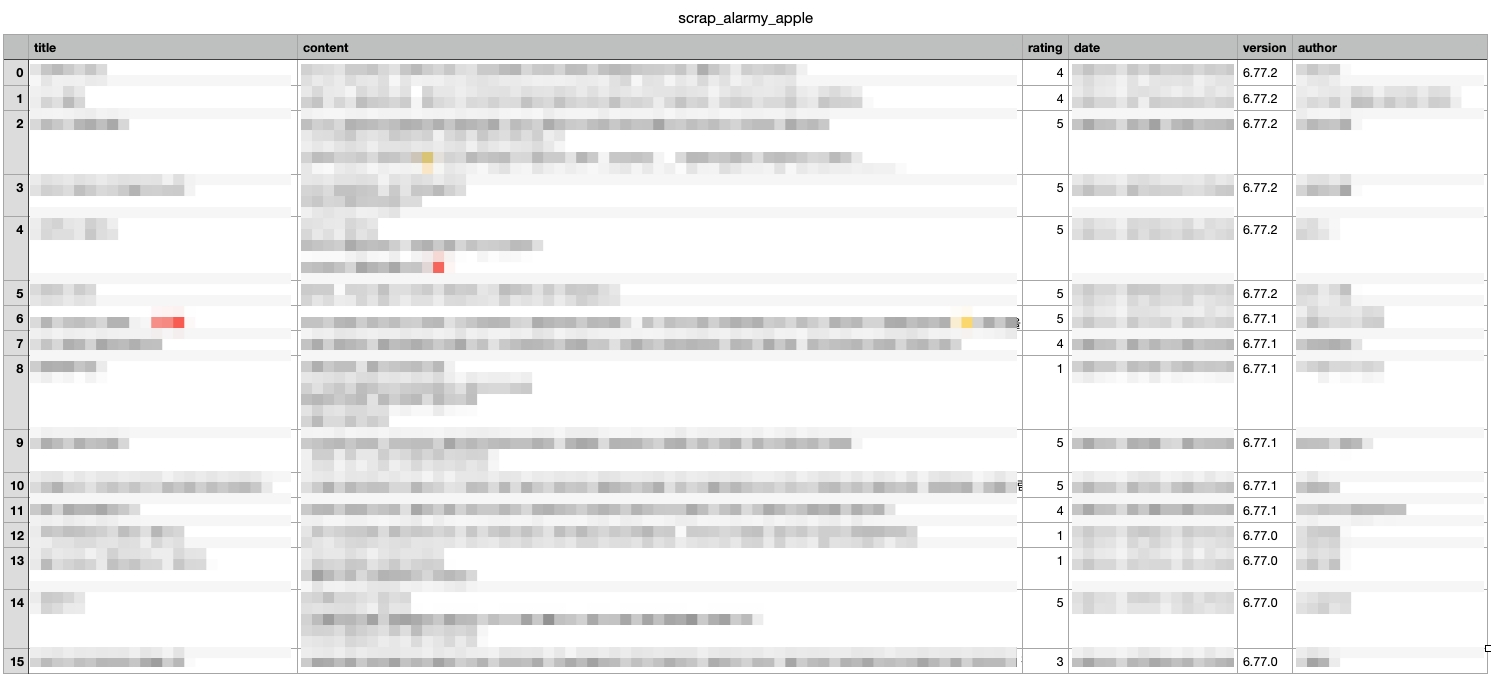
Result
리뷰 제목, 내용, 별점, 일자, 앱 버전, 작성자를 불러올 수 있음.
Futhurmore Action
- 최근 500개 뿐만 아니라, 모든 리뷰를 수집하는 방법 연구
(참고)API를 이용해 정식으로 정보를 받으러면 Apple Developer Program에 가입해야 하는 듯 - 개발자의 답변을 스크랩 하는 방법 연구
- 구글 플레이스토어 리뷰 스크랩
- 다른 코드 연구
https://pypi.org/project/app-store-scraper/
https://python.plainenglish.io/scraping-app-store-reviews-with-python-90e4117ccdfb
Reference
- 리뷰xml 주소 : https://myinbox.tistory.com/161
// reading compass
이 글과 이어지는 경로
시리즈, 카테고리, 태그 겹침, 최신도를 점수화해 가까운 글일수록 중심에 배치합니다.
댓글 남기기