
Stream
소개
Stream이란, LLM의 답변이 타이핑하듯 순서대로 출력되는 방식을 가리킵니다. ChatGPT 등 상용 LLM 서비스에서 볼 수 있는 기본적인 답변 표현 방식니다.
Stream을 적용하면, 완전한 응답이 준비되기 전에도 출력을 점진적으로 표시할 수 있다는 특징이 있으며, 이는 사용자가 기다리는 시간을 최소화해 경험(UX)를 크게 향상시킬 수 있다는 장점으로 이어집니다.
예시

실습 내용
- OpenAI API에서 기본적인 stream 적용 방법
- 일반 응답과 Stream 응답의 형태 비교
- 펑션콜링 코드에 stream 적용하기
기본적인 stream 적용 방법
- openai 기준, 응답을 요청할 때
stream옵션을 활성화해주면 됩니다.
1
2
3
4
5
6
7
8
9
10
11
from openai import OpenAI

client = OpenAI(api_key = api_key)

response = client.chat.completions.create(
        model = model,
        temperature = temperature,
        messages = messages,
        tools = tools,
        stream = True # stream
    )
일반 응답과 Stream 응답의 형태 비교
LLM에 Stream 형태의 출력을 적용할 때에는 주의해야 할 사항들이 있습니다.
- Stream을 적용할 때와 적용하지 않을 때, LLM의 응답 메시지 형식이 다릅니다.
- 일반적인 LLM 답변과 펑션 콜링의 답변 형식이 다르며, Stream에서 각별히 주의해 처리해야 합니다.
따라서, 코드에 Stream 을 적용하기 전에 상황별 LLM 응답 형태, 구조를 먼저 살펴보겠습니다.
- 일반 답변
1
2
3
4
5
6
7
8
9
10
11
12
13
14
15
16
17
18
# 1. 일반 답변

# - 답변 구조
ChatCompletion(
    id='chatcmpl-...',
    choices=[ # choices
        Choice(
            finish_reason='stop',
            index=0
            logprobs=None,
            message=ChatCompletionMessage(
                content='안녕하세요! 무엇을 도와드릴까요?', # 답변 텍스트
                role='assistant',
                audio=None,
                function_call=None,
                tool_calls=None
                ...
- stream 적용 답변
1
2
3
4
5
6
7
8
9
10
11
12
13
14
15
16
17
18
19
20
21
22
23
24
25
26
27
28
# stream 적용시
user : 안녕?

# - 답변 구조
ChatCompletionChunk(
    id='chatcmpl-...',
    choices=[
        Choice(
            delta=ChoiceDelta( # 응답이 "delta" 라는 곳에 담김
                content='',    # 첫 응답은 비어있음
                role='assistant',
                function_call=None,
                tool_calls=None
                ...

# 답변
ChatCompletionChunk( .. choices=[ .. (delta=ChoiceDelta(content='',  ...
ChatCompletionChunk( .. choices=[ .. (delta=ChoiceDelta(content='안',  ...
ChatCompletionChunk( .. choices=[ .. (delta=ChoiceDelta(content='녕하세요', ...
ChatCompletionChunk( .. choices=[ .. (delta=ChoiceDelta(content='!', ...
ChatCompletionChunk( .. choices=[ .. (delta=ChoiceDelta(content=' 어떻게', ...
ChatCompletionChunk( .. choices=[ .. (delta=ChoiceDelta(content=' 도', ...
ChatCompletionChunk( .. choices=[ .. (delta=ChoiceDelta(content='와', ...
ChatCompletionChunk( .. choices=[ .. (delta=ChoiceDelta(content='드', ...
ChatCompletionChunk( .. choices=[ .. (delta=ChoiceDelta(content='릴', ...
ChatCompletionChunk( .. choices=[ .. (delta=ChoiceDelta(content='까요', ...
ChatCompletionChunk( .. choices=[ .. (delta=ChoiceDelta(content='?', ...
ChatCompletionChunk( .. choices=[ .. (delta=ChoiceDelta(content=None, ... finish_reason='stop', index=0, logprobs=None)
- 일반 펑션 콜링
1
2
3
4
5
6
7
8
9
10
11
12
13
14
15
16
17
18
19
20
21
22
23
24
25
26
27
28
29
30
31
32
33
34
35
36
37
38
# 일반 펑션 콜링
user: 서울과 뉴욕의 현재 시간은?

# 답변 구조
ChatCompletion(
    id='chatcmpl-...',
    choices=[
        Choice(
            finish_reason='tool_calls',
            message=ChatCompletionMessage(
                content=None,
                role='assistant',
                tool_calls=[
                    ChatCompletionMessageFunctionToolCall( # 펑션콜 1 : 서울시간
                        id='call_....', # 콜 ID
                        function=Function(
                            arguments='{"timezone": "Asia/Seoul"}', # 인자(argument)
                            name='get_current_time' # 실행할 항수명
                        ),
                        type='function'
                    ),
                    ChatCompletionMessageFunctionToolCall( # 펑션콜 2 : 뉴욕시간
                        id='call_....', # 콜 ID
                        function=Function(
                            arguments='{"timezone": "America/New_York"}', # 인자(argument)
                            name='get_current_time'  # 실행할 항수명
                        ),
                        type='function'
                    )
                ],
                ...
            )
        )
    ],
    created=1770044794,
    ...
    )
)
- stream 적용 펑션 콜링
1
2
3
4
5
6
7
8
9
10
11
12
13
14
15
16
17
18
user : 서울과 뉴욕의 시간은?
[
 ChoiceDelta..(index=0, id='...', function=ChoiceDeltaToolCallFunction(arguments='', name='get_current_time'), type='function'),
 ChoiceDelta..(index=0, id=None, function=ChoiceDeltaToolCallFunction(arguments='{"ti', name=None), type=None),
 ChoiceDelta..(index=0, id=None, function=ChoiceDeltaToolCallFunction(arguments='mezon', name=None), type=None),
 ChoiceDelta..(index=0, id=None, function=ChoiceDeltaToolCallFunction(arguments='e": "A', name=None), type=None),
 ChoiceDelta..(index=0, id=None, function=ChoiceDeltaToolCallFunction(arguments='sia/', name=None), type=None),
 ChoiceDelta..(index=0, id=None, function=ChoiceDeltaToolCallFunction(arguments='Seoul', name=None), type=None),
 ChoiceDelta..(index=0, id=None, function=ChoiceDeltaToolCallFunction(arguments='"}', name=None), type=None),
 ChoiceDelta..(index=1, id='...', function=ChoiceDeltaToolCallFunction(arguments='', name='get_current_time'), type='function'),
 ChoiceDelta..(index=1, id=None, function=ChoiceDeltaToolCallFunction(arguments='{"ti', name=None), type=None),
 ChoiceDelta..(index=1, id=None, function=ChoiceDeltaToolCallFunction(arguments='mezon', name=None), type=None),
 ChoiceDelta..(index=1, id=None, function=ChoiceDeltaToolCallFunction(arguments='e": "A', name=None), type=None),
 ChoiceDelta..(index=1, id=None, function=ChoiceDeltaToolCallFunction(arguments='meri', name=None), type=None),
 ChoiceDelta..(index=1, id=None, function=ChoiceDeltaToolCallFunction(arguments='ca/Ne', name=None), type=None),
 ChoiceDelta..(index=1, id=None, function=ChoiceDeltaToolCallFunction(arguments='w_York', name=None), type=None),
 ChoiceDelta..(index=1, id=None, function=ChoiceDeltaToolCallFunction(arguments='"}', name=None), type=None)
]
- 비교표
| 구분 | 일반 답변 | Stream 적용 답변 | 일반 Function Calling | Stream 적용 Function Calling |
|---|---|---|---|---|
| API 응답 타입 | ChatCompletion | ChatCompletionChunk | ChatCompletion | ChatCompletionChunk |
| 데이터 전달 방식 | 한 번에 전체 응답 전달 | 여러 조각(chunk)으로 분할 전달 | 함수 호출 정보를 한 번에 전달 | 함수 호출 정보가 여러 chunk로 분할 |
| 실제 답변 위치 | message.content | delta.content | tool_calls[].function.arguments | delta.function.arguments |
| 응답 완료 표시 | finish_reason=’stop’ | 마지막 chunk에 finish_reason=’stop’ | finish_reason=’tool_calls’ | 마지막 chunk에서 완성 |
| 사용 목적 | 단순 텍스트 응답 | 실시간 UX 제공 | 외부 함수 실행 필요 시 | 함수 호출을 스트리밍으로 구성 |
| 처리 복잡도 | 가장 단순 | 중간 | 중간 | 가장 복잡 |
펑션콜링 코드에 stream 적용하기
OpenAI API 를 기준으로 작성하였습니다.
펑션콜링 코드
이전 포스팅인 “펑션 콜링 실습” 을 참고하기시 바랍니다.
https://whdrns2013.github.io/ai/20260202_002_function_calling_practice/
일반 답변 코드 stream 적용
- 원 코드
1
2
3
4
5
6
7
8
# AI의 1차 답변
response = get_ai_response(messages=messages)
ai_message = response.choices[0].message.content
messages.append({"role":"assistant", "content":ai_message})

# 화면 출력
if ai_message:
    print("◆ AI\t:" + ai_message)
- stream 적용 코드
1
2
3
4
5
6
7
8
9
10
11
12
13
14
15
# AI의 1차 답변
response = get_ai_response(messages=messages)

# AI 1차 답변 분석 및 처리
ai_message = None
if stream:
    ai_message = ""
    for chunk in response: # 응답 안의 ChatCompletionChunk
        if hasattr(chunk, "choices"):
            content_chunk = chunk.choices[0].delta.content # delta의 content
            if content_chunk:
                print(content_chunk, end='', flush=True) # 생성된 토큰씩 출력
                ai_message += content_chunk
    print("\n")
    messages.append({"role":"assistant", "content":ai_message})
- 적용 결과
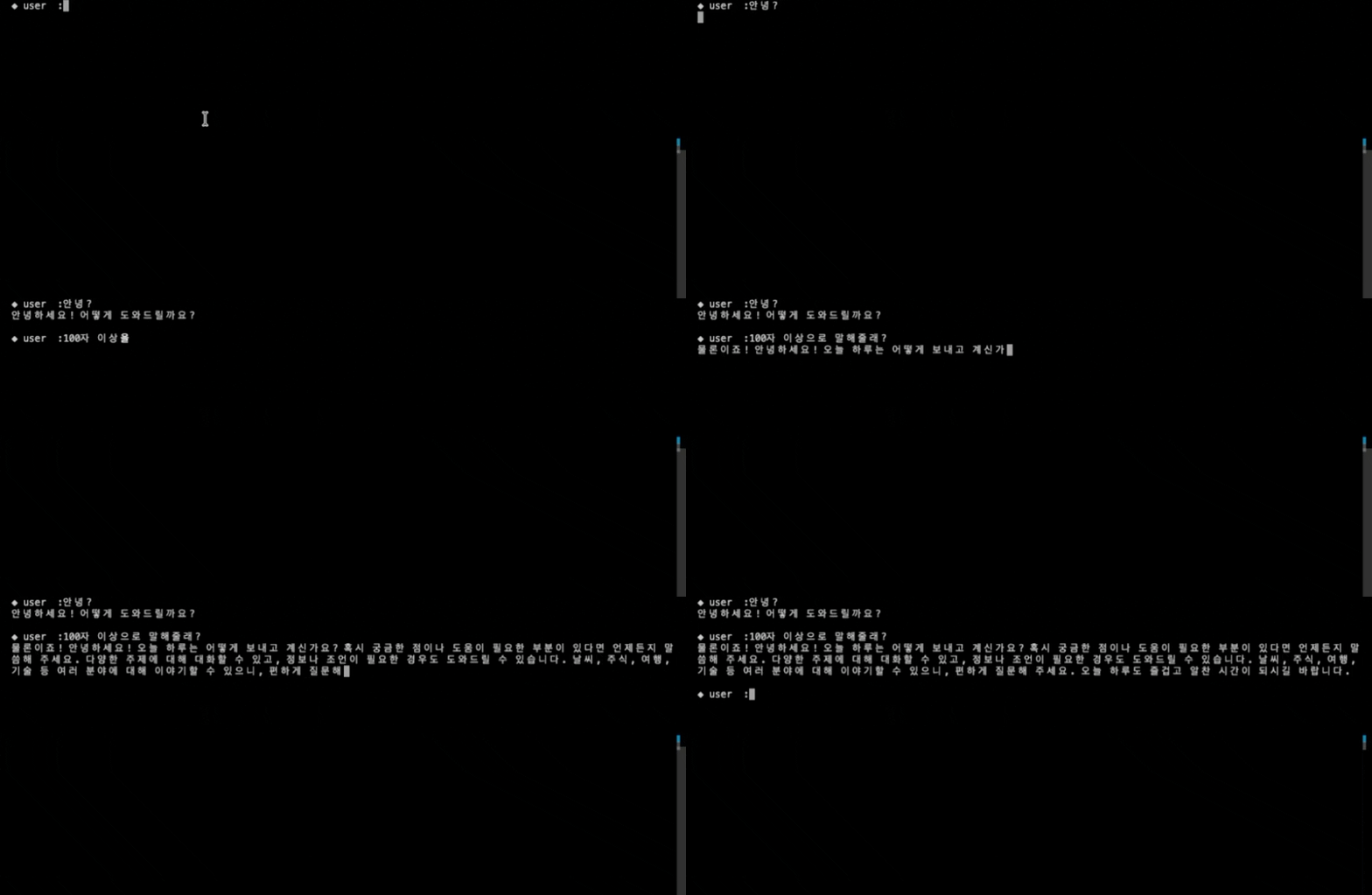
펑션 콜링 코드 stream 적용
- 원 코드
1
2
3
4
5
6
7
8
9
10
11
12
13
14
15
16
17
18
19
20
21
22
23
24
25
26
27
28
# AI의 1차 답변
response = get_ai_response(messages=messages)

# AI 1차 답변 분석 및 처리
ai_message = None
if hasattr(response, "choices"):
    if response.choices[0].message.tool_calls:
        print(response)
        ai_message_obj = response.choices[0].message
        tool_calls = ai_message_obj.tool_calls

        # messages 에 tool calls 추가
        messages.append(ai_message_obj)

        # 펑션 콜링 처리
        for tool_call in tool_calls:
            tool_name = tool_call.function.name
            tool_call_id = tool_call.id
            arguments = json.loads(tool_call.function.arguments)
            func_result = tool_mapping(tool_name=tool_name, arguments=arguments)
            messages.append({"role":"tool", "tool_call_id":tool_call_id, "name":tool_name, "content":str(func_result)})

        # 펑션콜링 결과를 반영한 AI 2차 답변
        response = get_ai_response(messages=messages)

    # AI 최종 응답
    ai_message = response.choices[0].message.content
    messages.append({"role":"assistant", "content":ai_message})
- stream 적용 코드
1
2
3
4
5
6
7
8
9
10
11
12
13
14
15
16
17
18
19
20
21
22
23
24
25
26
27
28
29
30
31
32
33
34
35
36
37
if stream:
    ai_message = ""
    tool_calls_chunk = []
    print("◆ AI\t:", end='')
    for chunk in response: # 응답 안의 ChatCompletionChunk
        if hasattr(chunk, "choices"):
            content_chunk = chunk.choices[0].delta.content # delta의 content
            if content_chunk:
                print(content_chunk, end='', flush=True) # 생성된 토큰씩 출력
                ai_message += content_chunk
            # 응답 안의 chunk 에서 tool_call 내용 수집
            tool_delta = chunk.choices[0].delta
            if hasattr(tool_delta, "tool_calls") and tool_delta.tool_calls:
                tool_calls_chunk += tool_delta.tool_calls

    # 펑션 콜링이 있는 경우
    if tool_calls_chunk:
        ai_message = ""
        tool_obj = tool_list_to_tool_obj(tool_calls_chunk) # tool call 내용을 펑션 콜링하기 편한 방식으로 변환
        messages.append({"role":"assistant", "content":None, "tool_calls":tool_obj["tool_calls"]})
        for tool_call in tool_obj["tool_calls"]:
            tool_name = tool_call["function"]["name"]
            tool_call_id = tool_call["id"]
            arguments = json.loads(tool_call["function"]["arguments"])
            func_result = tool_mapping(tool_name=tool_name, arguments=arguments)
            messages.append({"role":"tool", "tool_call_id":tool_call_id, "name":tool_name, "content":str(func_result)})
        response = get_ai_response(messages=messages, stream=stream)
        for chunk in response: # 응답 안의 ChatCompletionChunk
            if hasattr(chunk, "choices"):
                content_chunk = chunk.choices[0].delta.content # delta의 content
                if content_chunk:
                    print(content_chunk, end='', flush=True) # 생성된 토큰씩 출력
                    ai_message += content_chunk
    print("\n")

    # AI 응답을 적재
    messages.append({"role":"assistant", "content":ai_message})
1
2
3
4
5
6
7
8
9
10
11
12
13
14
15
16
17
18
19
20
21
22
23
24
25
26
27
28
29
30
31
32
33
34
35
36
37
# utils/tool_list_to_tool_obj.py
from dataclasses import dataclass, asdict
from collections import defaultdict

@dataclass
class OpenAIFunction:
    arguments   :str|None=""
    name        :str|None=None

@dataclass
class ToolObject:
    id          :str|None=None
    function    :OpenAIFunction|None=None
    type        :str|None=None

def tool_list_to_tool_obj(tools:list):
    tool_map = defaultdict(lambda: ToolObject(function=OpenAIFunction()))

    for tool_call in tools:
        to = tool_map[tool_call.index]

        # tool call ID
        if tool_call.id is not None:
            to.id = tool_call.id

        # function name
        if tool_call.function.name is not None:
            to.function.name = tool_call.function.name

        # arguments
        to.function.arguments += tool_call.function.arguments

        # tool call type
        if tool_call.type is not None:
            to.type = tool_call.type

    return {"tool_calls" : [asdict(to) for to in tool_map.values()]}

전체 코드
전체 코드 펼치기/접기
1
2
3
4
5
6
7
8
9
10
11
12
13
14
15
16
17
18
19
20
21
22
23
24
25
26
27
28
29
30
31
32
33
34
35
36
37
38
39
40
41
42
43
44
45
46
47
48
49
50
51
52
53
54
55
56
57
58
59
60
61
62
63
64
65
66
67
68
69
70
71
72
73
74
75
76
77
78
79
80
81
82
83
84
85
86
87
88
89
90
91
92
93
94
95
96
97
98
99
100
101
102
103
104
105
# terminal_chat.py
from openai import OpenAI
from tools.gpt_functions import tools, tool_mapping
from utils.tool_list_to_tool_obj import tool_list_to_tool_obj
from config.config import config
import json

def get_ai_response(messages:list[dict],
                    model:str="gpt-4o",
                    tools=tools,
                    api_key:str=config.get("apikey", "openai"),
                    stream=True):
    client = OpenAI(api_key = api_key)
    response = client.chat.completions.create(
        model = model,
        messages = messages,
        tools = tools,
        stream = stream
    )
    return response

def terminal_chat_stream(stream=True):
    messages = []
    while True:
        # 사용자 입력
        user_input = input("◆ user\t:")
        if user_input == "exit":
            break

        # 대화 내역 추가
        messages.append({"role":"user", "content":user_input})

        # AI의 1차 답변
        response = get_ai_response(messages=messages, stream=stream)

        # AI 1차 답변 분석 및 처리
        ai_message = None
        if stream:
            ai_message = ""
            tool_calls_chunk = []
            print("◆ AI\t:", end='')
            for chunk in response: # 응답 안의 ChatCompletionChunk
                if hasattr(chunk, "choices"):
                    content_chunk = chunk.choices[0].delta.content # delta의 content
                    if content_chunk:
                        print(content_chunk, end='', flush=True) # 생성된 토큰씩 출력
                        ai_message += content_chunk
                    # 응답 안의 chunk 에서 tool_call 내용 수집
                    tool_delta = chunk.choices[0].delta
                    if hasattr(tool_delta, "tool_calls") and tool_delta.tool_calls:
                        tool_calls_chunk += tool_delta.tool_calls

            # 펑션 콜링이 있는 경우
            if tool_calls_chunk:
                ai_message = ""
                tool_obj = tool_list_to_tool_obj(tool_calls_chunk) # tool call 내용을 펑션 콜링하기 편한 방식으로 변환
                messages.append({"role":"assistant", "content":None, "tool_calls":tool_obj["tool_calls"]})
                for tool_call in tool_obj["tool_calls"]:
                    tool_name = tool_call["function"]["name"]
                    tool_call_id = tool_call["id"]
                    arguments = json.loads(tool_call["function"]["arguments"])
                    func_result = tool_mapping(tool_name=tool_name, arguments=arguments)
                    messages.append({"role":"tool", "tool_call_id":tool_call_id, "name":tool_name, "content":str(func_result)})
                response = get_ai_response(messages=messages, stream=stream)
                for chunk in response: # 응답 안의 ChatCompletionChunk
                    if hasattr(chunk, "choices"):
                        content_chunk = chunk.choices[0].delta.content # delta의 content
                        if content_chunk:
                            print(content_chunk, end='', flush=True) # 생성된 토큰씩 출력
                            ai_message += content_chunk
            print("\n")

            # AI 응답을 적재
            messages.append({"role":"assistant", "content":ai_message})
        else:
            if hasattr(response, "choices"):

                # 펑션 콜링 처리
                if response.choices[0].message.tool_calls:
                    print(response)
                    ai_message_obj = response.choices[0].message
                    tool_calls = ai_message_obj.tool_calls

                    # messages 에 tool calls 추가
                    messages.append(ai_message_obj)

                    # 펑션 콜링 처리
                    for tool_call in tool_calls:
                        tool_name = tool_call.function.name
                        tool_call_id = tool_call.id
                        arguments = json.loads(tool_call.function.arguments)
                        func_result = tool_mapping(tool_name=tool_name, arguments=arguments)
                        messages.append({"role":"tool", "tool_call_id":tool_call_id, "name":tool_name, "content":str(func_result)})

                    # 펑션콜링 결과를 반영한 AI 2차 답변
                    response = get_ai_response(messages=messages)

                # AI 최종 응답
                ai_message = response.choices[0].message.content
                messages.append({"role":"assistant", "content":ai_message})

            # 화면 출력
            if ai_message:
                print("◆ AI\t:" + ai_message)
리팩토링이 필요하다.
Comments